
n this tutorial, we will see Spring MVC angularjs example.
Spring MVC tutorial:
- Spring MVC hello world example
- Spring MVC Hibernate MySQL example
- Spring MVC interceptor example
- Spring MVC angularjs example
- Spring MVC @RequestMapping example
- Spring Component,Service, Repository and Controller example
- Spring MVC @ModelAttribute annotation example
- Spring MVC @RestController annotation example
- Spring MultiActionController Example
- Spring MVC ModelMapSpring MVC file upload example
- Spring restful web service example
- Spring restful web service json example
- Spring Restful web services CRUD example
- Spring security hello world example
- Spring security custom login form example
In this post, we will create Spring MVC REST APIs and perform CRUD operations using AngularJs by calling REST APIs.
Github Source code:
Here are steps to create a simple Spring Rest API which will provide CRUD opertions and angularJS to call Spring MVC APIs.
1) Create a dynamic web project using maven in eclipse named “AngularjsSpringRestExample”
Maven dependencies
2)Now create pom.xml as follows:
pom.xml
<project xmlns="http://maven.apache.org/POM/4.0.0" xmlns:xsi="http://www.w3.org/2001/XMLSchema-instance"
  xsi:schemaLocation="http://maven.apache.org/POM/4.0.0 http://maven.apache.org/maven-v4_0_0.xsd">
  <modelVersion>4.0.0</modelVersion>
  <groupId>com.arpit.java2blog</groupId>
  <artifactId>AngularjsSpringRestExample</artifactId>
  <packaging>war</packaging>
  <version>0.0.1-SNAPSHOT</version>
  <name>AngularjsSpringRestExample Maven Webapp</name>
  <url>http://maven.apache.org</url>
  <dependencies>
    <dependency>
      <groupId>junit</groupId>
      <artifactId>junit</artifactId>
      <version>3.8.1</version>
      <scope>test</scope>
    </dependency>
    <dependency>
   <groupId>javax.servlet</groupId>
   <artifactId>javax.servlet-api</artifactId>
   <version>3.1.0</version>
  </dependency>

  <dependency>
   <groupId>org.springframework</groupId>
   <artifactId>spring-core</artifactId>
   <version>${spring.version}</version>
  </dependency>
  <dependency>
   <groupId>org.springframework</groupId>
   <artifactId>spring-webmvc</artifactId>
   <version>${spring.version}</version>
  </dependency>
   <dependency>
            <groupId>com.fasterxml.jackson.core</groupId>
            <artifactId>jackson-databind</artifactId>
             <version>2.4.1</version>
        </dependency>
 </dependencies>
 <build>
  <finalName>AngularjsSpringRestExample</finalName>

  <plugins>
   <plugin>
    <groupId>org.apache.maven.plugins</groupId>
    <artifactId>maven-compiler-plugin</artifactId>
    <version>3.1</version>
    <configuration>
     <source>${jdk.version}</source>
     <target>${jdk.version}</target>
    </configuration>
   </plugin>
  </plugins>

 </build>
 <properties>
  <spring.version>4.2.1.RELEASE</spring.version>
  <jdk.version>1.7</jdk.version>
 </properties>

</project>
Application configuration:
3) create web.xml as below:
<!DOCTYPE web-app PUBLIC
 "-//Sun Microsystems, Inc.//DTD Web Application 2.3//EN"
 "http://java.sun.com/dtd/web-app_2_3.dtd" >

<web-app>
  <display-name>Archetype Created Web Application</display-name>
  <servlet>
 <servlet-name>springrest</servlet-name>
 <servlet-class>
  org.springframework.web.servlet.DispatcherServlet
 </servlet-class>
 <load-on-startup>1</load-on-startup>
</servlet>

<servlet-mapping>
 <servlet-name>springrest</servlet-name>
 <url-pattern>/</url-pattern>
</servlet-mapping>
</web-app>
4) create a xml file named springrest-servlet.xml in /WEB-INF/ folder.
<beans xmlns="http://www.springframework.org/schema/beans"
 xmlns:context="http://www.springframework.org/schema/context"
 xmlns:mvc="http://www.springframework.org/schema/mvc" xmlns:xsi="http://www.w3.org/2001/XMLSchema-instance"
 xsi:schemaLocation=" http://www.springframework.org/schema/beans http://www.springframework.org/schema/beans/spring-beans-3.0.xsd http://www.springframework.org/schema/context
        http://www.springframework.org/schema/context/spring-context-3.0.xsd http://www.springframework.org/schema/mvc http://www.springframework.org/schema/mvc/spring-mvc-3.0.xsd">

 <mvc:annotation-driven/>
<context:component-scan base-package="org.arpit.java2blog.controller" />
<mvc:default-servlet-handler/>
</beans>
Create bean class
5) Create a bean name “Country.java” in org.arpit.java2blog.bean.
package org.arpit.java2blog.bean;

public class Country{

    int id;
    String countryName;
    long population;

    public Country() {
        super();
    }
    public Country(int i, String countryName,long population) {
        super();
        this.id = i;
        this.countryName = countryName;
        this.population=population;
    }
    public int getId() {
        return id;
    }
    public void setId(int id) {
        this.id = id;
    }
    public String getCountryName() {
        return countryName;
    }
    public void setCountryName(String countryName) {
        this.countryName = countryName;
    }
    public long getPopulation() {
        return population;
    }
    public void setPopulation(long population) {
        this.population = population;
    }

}
Create Controller
6) Create a controller named “CountryController.java” in package org.arpit.java2blog.controller
package org.arpit.java2blog.controller;

import java.util.List;
import javax.servlet.http.HttpServletRequest;
import org.arpit.java2blog.bean.Country;
import org.arpit.java2blog.service.CountryService;
import org.springframework.beans.factory.annotation.Autowired;
import org.springframework.web.bind.annotation.PathVariable;
import org.springframework.web.bind.annotation.RequestBody;
import org.springframework.web.bind.annotation.RequestMapping;
import org.springframework.web.bind.annotation.RequestMethod;
import org.springframework.web.bind.annotation.RestController;

@RestController
public class CountryController {

    @Autowired
    private HttpServletRequest request;
    CountryService countryService = new CountryService();

    @RequestMapping(value = "/countries", method = RequestMethod.GET, headers = "Accept=application/json")
    public List getCountries() {

        List listOfCountries = countryService.getAllCountries();
        return listOfCountries;
    }

    @RequestMapping(value = "/country/{id}", method = RequestMethod.GET, headers = "Accept=application/json")
    public Country getCountryById(@PathVariable int id) {
        return countryService.getCountry(id);
    }

    @RequestMapping(value = "/countries", method = RequestMethod.POST, headers = "Accept=application/json")
    public Country addCountry(@RequestBody Country country) {
        return countryService.addCountry(country);
    }

    @RequestMapping(value = "/countries", method = RequestMethod.PUT, headers = "Accept=application/json")
    public Country updateCountry(@RequestBody Country country) {
        return countryService.updateCountry(country);

    }

    @RequestMapping(value = "/country/{id}", method = RequestMethod.DELETE, headers = "Accept=application/json")
    public void deleteCountry(@PathVariable("id") int id) {
        countryService.deleteCountry(id);

    }
}
Create Service class
It is just a helper class which should be replaced by database implementation. It is not very well written class, it is just used for demonstration.
package org.arpit.java2blog.service;

import java.util.ArrayList;
import java.util.HashMap;
import java.util.List;

import org.arpit.java2blog.bean.Country;

/*
 * It is just a helper class which should be replaced by database implementation.
 * It is not very well written class, it is just used for demonstration.
 */
public class CountryService {

    static HashMap<Integer,Country> countryIdMap=getCountryIdMap();

    public CountryService() {
        super();

        if(countryIdMap==null)
        {
            countryIdMap=new HashMap<Integer,Country>();
            // Creating some objects of Country while initializing
            Country indiaCountry=new Country(1, "India",10000);
            Country chinaCountry=new Country(4, "China",20000);
            Country nepalCountry=new Country(3, "Nepal",8000);
            Country bhutanCountry=new Country(2, "Bhutan",7000);

            countryIdMap.put(1,indiaCountry);
            countryIdMap.put(4,chinaCountry);
            countryIdMap.put(3,nepalCountry);
            countryIdMap.put(2,bhutanCountry);
        }
    }

    public List getAllCountries()
    {
        List countries = new ArrayList(countryIdMap.values());
        return countries;
    }

    public Country getCountry(int id)
    {
        Country country= countryIdMap.get(id);
        return country;
    }
    public Country addCountry(Country country)
    {
        country.setId(getMaxId()+1);
        countryIdMap.put(country.getId(), country);
        return country;
    }

    public Country updateCountry(Country country)
    {
        if(country.getId()<=0)
            return null;
        countryIdMap.put(country.getId(), country);
        return country;

    }
    public void deleteCountry(int id)
    {
        countryIdMap.remove(id);
    }

    public static HashMap<Integer, Country> getCountryIdMap() {
        return countryIdMap;
    }

    // Utility method to get max id
    public static int getMaxId()
    {   int max=0;
    for (int id:countryIdMap.keySet()) {
        if(max<=id)
            max=id;

    }
    return max;
    }
}
AngularJS view
8) create angularJSCrudExample.html in WebContent folder with following content:
<html>
  <head>

  <script src="https://ajax.googleapis.com/ajax/libs/angularjs/1.4.4/angular.js"></script>

    <title>AngularJS $http Rest example</title>
 <script type="text/javascript">
            var app = angular.module("CountryManagement", []);

            //Controller Part
            app.controller("CountryController", function($scope, $http) {

                $scope.countries = [];
                $scope.countryForm = {
                    id : -1,
                    countryName : "",
                    population : ""
                };

                //Now load the data from server
                _refreshCountryData();

                //HTTP POST/PUT methods for add/edit country
                // with the help of id, we are going to find out whether it is put or post operation

                $scope.submitCountry = function() {

                    var method = "";
                    var url = "";
                    if ($scope.countryForm.id == -1) {
                        //Id is absent in form data, it is create new country operation
                        method = "POST";
                        url = '/AngularjsSpringRestExample/countries';
                    } else {
                        //Id is present in form data, it is edit country operation
                        method = "PUT";
                        url = '/AngularjsSpringRestExample/countries';
                    }

                    $http({
                        method : method,
                        url : url,
                        data : angular.toJson($scope.countryForm),
                        headers : {
                            'Content-Type' : 'application/json'
                        }
                    }).then( _success, _error );
                };

                //HTTP DELETE- delete country by Id
                $scope.deleteCountry = function(country) {
                    $http({
                        method : 'DELETE',
                        url : '/AngularjsSpringRestExample/country/' + country.id
                    }).then(_success, _error);
                };

             // In case of edit, populate form fields and assign form.id with country id
                $scope.editCountry = function(country) {

                    $scope.countryForm.countryName = country.countryName;
                    $scope.countryForm.population = country.population;
                    $scope.countryForm.id = country.id;
                };

                /* Private Methods */
                //HTTP GET- get all countries collection
                function _refreshCountryData() {
                    $http({
                        method : 'GET',
                        url : 'http://localhost:8080/AngularjsSpringRestExample/countries'
                    }).then(function successCallback(response) {
                        $scope.countries = response.data;
                    }, function errorCallback(response) {
                        console.log(response.statusText);
                    });
                }

                function _success(response) {
                    _refreshCountryData();
                    _clearFormData()
                }

                function _error(response) {
                    console.log(response.statusText);
                }

                //Clear the form
                function _clearFormData() {
                    $scope.countryForm.id = -1;
                    $scope.countryForm.countryName = "";
                    $scope.countryForm.population = "";

                };
            });
        </script>
        <style>

.blue-button{
 background: #25A6E1;
 filter: progid: DXImageTransform.Microsoft.gradient( startColorstr='#25A6E1',endColorstr='#188BC0',GradientType=0);
 padding:3px 5px;
 color:#fff;
 font-family:'Helvetica Neue',sans-serif;
 font-size:12px;
 border-radius:2px;
 -moz-border-radius:2px;
 -webkit-border-radius:4px;
 border:1px solid #1A87B9
}

.red-button{
 background: #CD5C5C;

 padding:3px 5px;
 color:#fff;
 font-family:'Helvetica Neue',sans-serif;
 font-size:12px;
 border-radius:2px;
 -moz-border-radius:2px;
 -webkit-border-radius:4px;
 border:1px solid #CD5C5C
}

table {
  font-family: "Helvetica Neue", Helvetica, sans-serif;
   width: 50%;
}

caption {
  text-align: left;
  color: silver;
  font-weight: bold;
  text-transform: uppercase;
  padding: 5px;
}

th {
  background: SteelBlue;
  color: white;
}

tbody tr:nth-child(even) {
  background: WhiteSmoke;
}

tbody tr td:nth-child(2) {
  text-align:center;
}

tbody tr td:nth-child(3),
tbody tr td:nth-child(4) {
  text-align: center;
  font-family: monospace;
}

tfoot {
  background: SeaGreen;
  color: white;
  text-align: right;
}

tfoot tr th:last-child {
  font-family: monospace;
}

            td,th{
                border: 1px solid gray;
                width: 25%;
                text-align: left;
                padding: 5px 10px;
            }

        </style>
    <head>
    <body ng-app="CountryManagement" ng-controller="CountryController">
         <h1>
           AngularJS Restful web services example using $http
        </h1>
        <form ng-submit="submitCountry()">
            <table>

                <tr>
                    <th colspan="2">Add/Edit country</th>
                 </tr>
                <tr>
                    <td>Country</td>
                    <td><input type="text" ng-model="countryForm.countryName" /></td>
                </tr>
                <tr>
                    <td>Population</td>
                    <td><input type="text" ng-model="countryForm.population"  /></td>
                </tr>
                <tr>
                    <td colspan="2"><input type="submit" value="Submit" class="blue-button" /></td>
                </tr>
            </table>
        </form>
        <table>
            <tr>

                <th>CountryName</th>
                <th>Population</th>
                <th>Operations</th>

            </tr>

            <tr ng-repeat="country in countries">

    <td> {{ country.countryName }}</td>
    <td >{{ country.population }}</td>

                <td><a ng-click="editCountry(country)" class="blue-button">Edit</a> | <a ng-click="deleteCountry(country)" class="red-button">Delete</a></td>
            </tr>

        </table>
  </body>
</html>
Explanation :
-
- We have injected $http as we have done in ajax example through controller constructor.
app.controller("CountryController", function($scope, $http) {

                $scope.countries = [];
...
-
- We have defined various methods depending on operations such as editCountry, deleteCountry, submitCountry
- When you click on submit button on form, it actually calls POST or PUT depending on operation. If you click on edit and submit data then it will be put operation as it will be update on existing resource. If you directly submit data, then it will be POST operation to create new resource,
- Every time you submit data, it calls refereshCountryData() to refresh country table below.
- When you call $http, you need to pass method type and URL, it will call it according, You can either put absolute URL or relative URL with respect to context root of web application.
 //HTTP GET- get all countries collection
                function _refreshCountryData() {
                    $http({
                        method : 'GET',
                        url : 'http://localhost:8080/AngularjsSpringRestExample/rest/countries'
                    }).then(function successCallback(response) {
                        $scope.countries = response.data;
                    }, function errorCallback(response) {
                        console.log(response.statusText);
                    });
                }
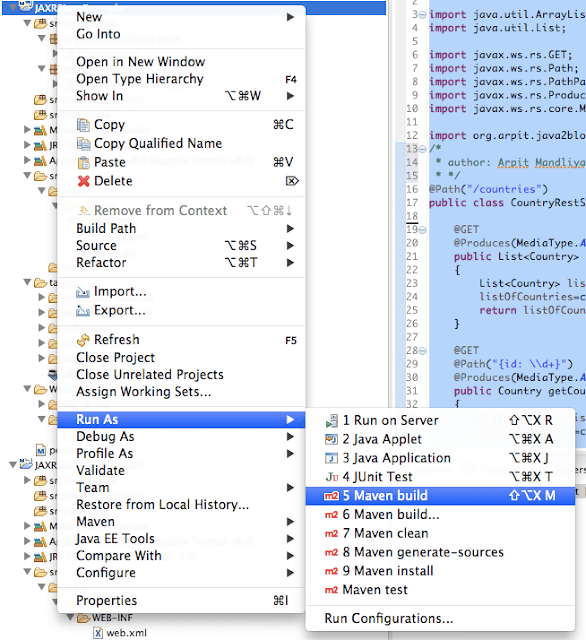
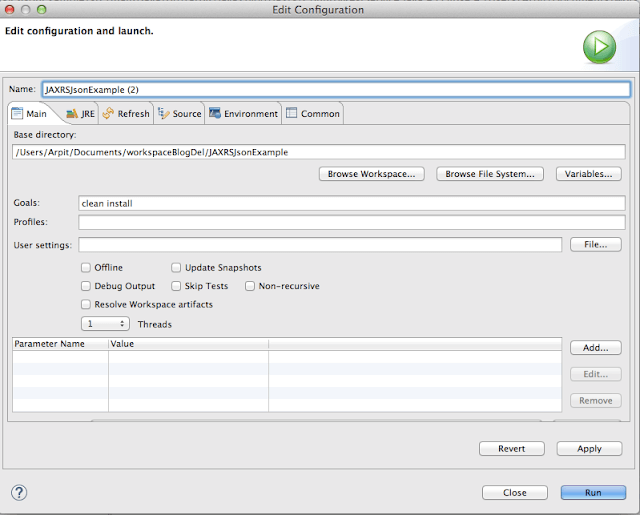
9) It ‘s time to do maven build.
Right click on project -> Run as -> Maven build
Run the application
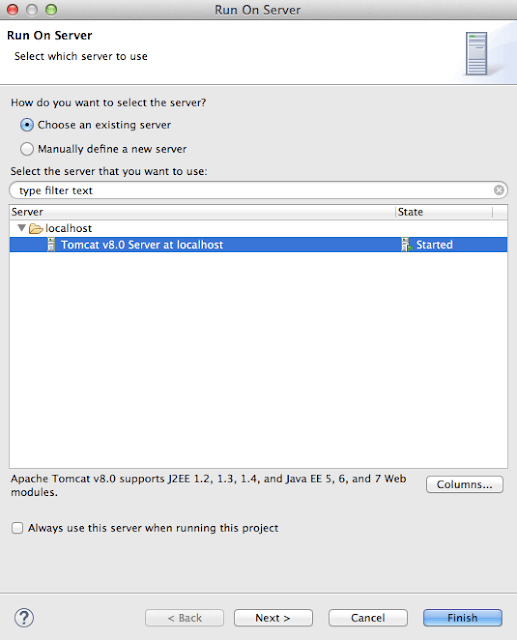
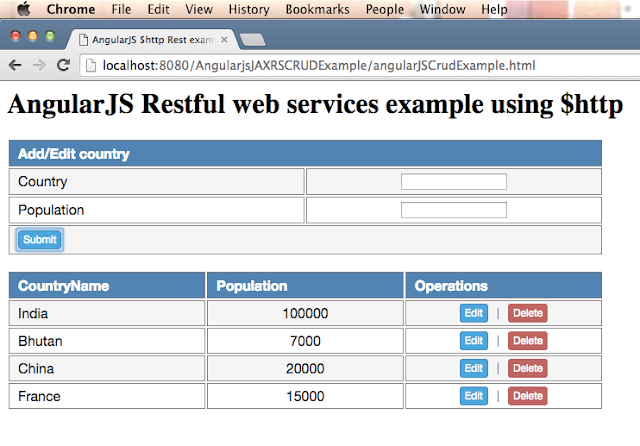
URL : “http://localhost:8080/AngularjsJAXRSCRUDExample/angularJSCrudExample.html”
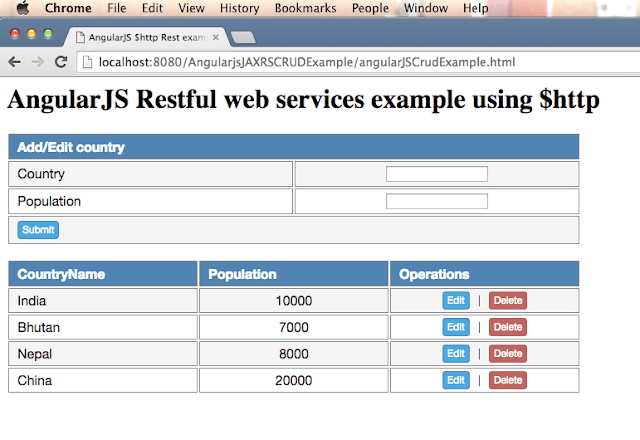
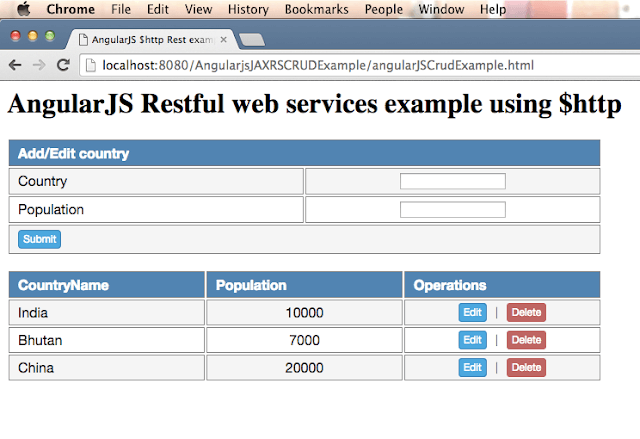
Lets click on delete button corresponding to Nepal and you will see below screen:
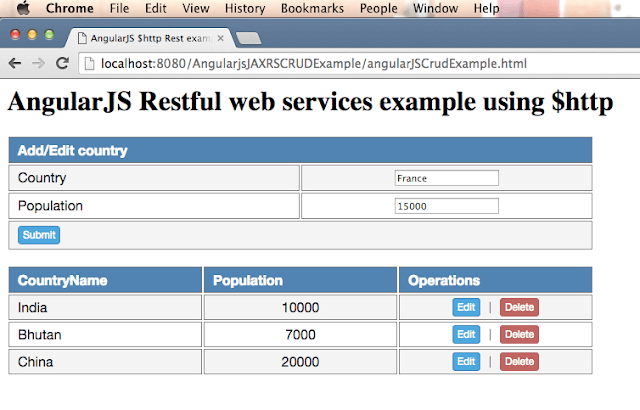
Lets add new country France with population 15000
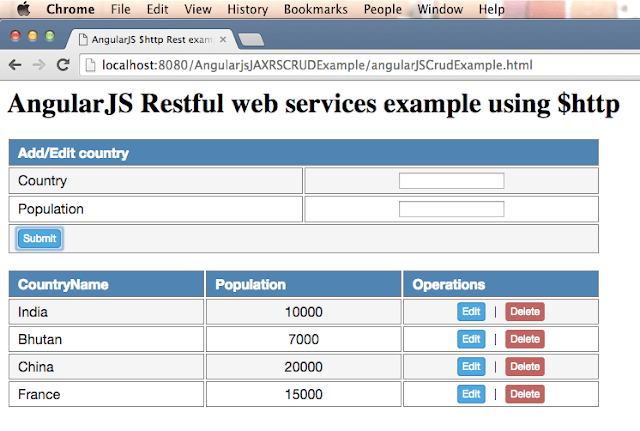
Click on submit and you will see below screen.
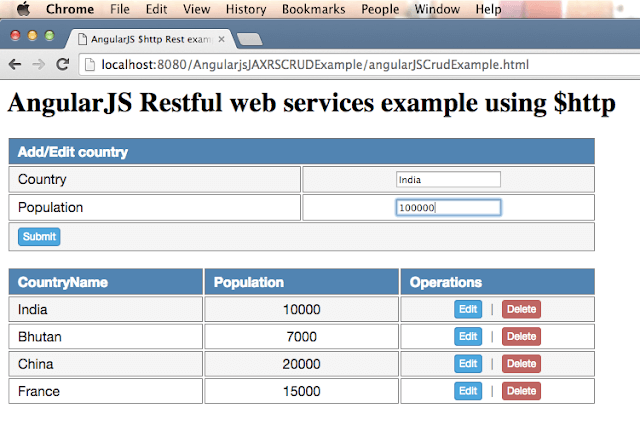
Now click on edit button corresponding to India and change population from 10000 to 100000.
Click on submit and you will see below screen:
Lets check Get method for Rest API
12) Test your get method REST service
URL :“http://localhost:8080/AngularjsSpringRestExample/countries/”.
You will get following output:
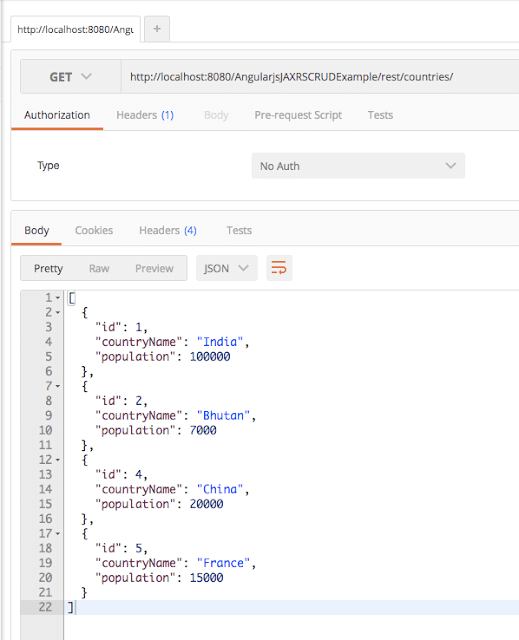
As you can see , all changes have been reflected in above get call.
Project structure:
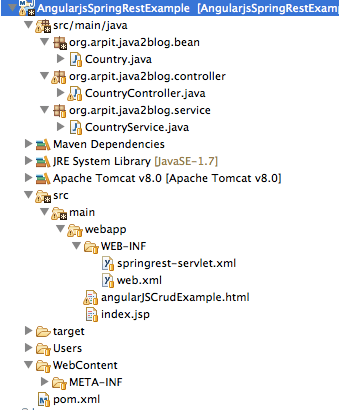
We are done with Spring MVC angularjs example.If you are still facing any issue, please comment.
