Ajax request in app.js
var app = angular.module('myApp', []);
 app.controller('java2blogContoller', function($scope,$http) {

  var url = "countries.json";
  $http.get(url).success( function(response) {
        $scope.countries = response;
     });
 });
As you can see here , we are injecting $http in controller function here and assigning response to countries list.
Lets see complete example:
Project structure:
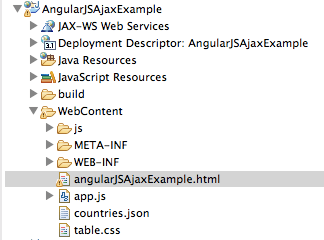
Step 1: Create dynamic web project named “AngularJSAjaxExample” in eclipse.
Step 2: We are going to read counties.json from server. Create countries.json in WebContent folder with below json text.
[
  {
    "id": 1,
    "countryName": "India",
    "population": 10000
  },
  {
    "id": 2,
    "countryName": "Bhutan",
    "population": 7000
  },
  {
    "id": 3,
    "countryName": "Nepal",
    "population": 8000
  },
  {
    "id": 4,
    "countryName": "China",
    "population": 20000
  }
]
Step 3: Create angularJSAjaxExample.html in WebContent folder as below:
Angular js


     ID
     Country Name
     Population


     {{ con.id }}
     {{ con.countryName }}
    {{ con.population }}
Here we are using ng-repeat tag to iterate counties list and showing it in table.
Step 4 : Create app.js in WebContent folder as below:
var app = angular.module('myApp', []);
 app.controller('java2blogContoller', function($scope,$http) {

  var url = "countries.json";

     $http.get(url).success( function(response) {
        $scope.countries = response;
     });
 });
Step 5: We are going to apply style on this table, so create table.css as below in WebContent folder.
table {
  font-family: "Helvetica Neue", Helvetica, sans-serif
}

caption {
  text-align: left;
  color: silver;
  font-weight: bold;
  text-transform: uppercase;
  padding: 5px;
}

thead {
  background: SteelBlue;
  color: white;
}

th,
td {
  padding: 5px 10px;
}

tbody tr:nth-child(even) {
  background: WhiteSmoke;
}

tbody tr td:nth-child(2) {
  text-align:center;
}

tbody tr td:nth-child(3),
tbody tr td:nth-child(4) {
  text-align: right;
  font-family: monospace;
}

tfoot {
  background: SeaGreen;
  color: white;
  text-align: right;
}

tfoot tr th:last-child {
  font-family: monospace;
}
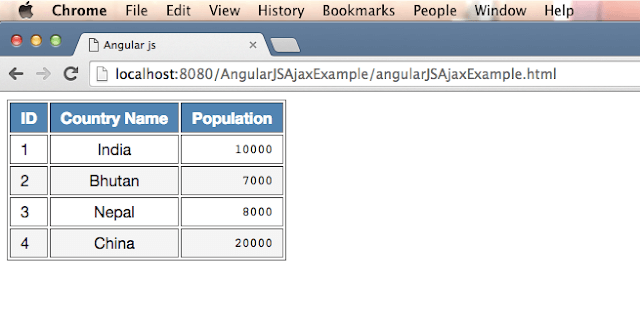
Step 6: Run the html file on the server. Right click on “angularJSAjaxExample.html” and go to run -> run on server.
You will see below output:
URL: http://localhost:8080/AngularJSAjaxExample/angularJSAjaxExample.html