
We have already seen Spring MVC, hibernate and mysql example in previous tutorial.
Spring Data JPA provides CRUD API, so you don’t have to write boiler plate code. You just need to create repository interface and spring will provide implementation automatically.
Spring MVC tutorial:
- Spring MVC hello world example
- Spring MVC Hibernate MySQL example
- Spring MVC interceptor example
- Spring MVC angularjs example
- Spring MVC @RequestMapping example
- Spring Component,Service, Repository and Controller example
- Spring MVC @ModelAttribute annotation example
- Spring MVC @RestController annotation example
- Spring MultiActionController Example
- Spring MVC ModelMap
- Spring MVC file upload example
- Spring restful web service example
- Spring restful web service json example
- Spring Restful web services CRUD example
- Spring security hello world example
- Spring security custom login form example
Here are steps to create a project with Spring MVC , Spring data, hibernate and mySQL crud example.
Source code:
Maven dependencies
2) We will use Spring 4 and hibernate 4 for this project.
pom.xml
<project xmlns="http://maven.apache.org/POM/4.0.0" xmlns:xsi="http://www.w3.org/2001/XMLSchema-instance"
 xsi:schemaLocation="http://maven.apache.org/POM/4.0.0 http://maven.apache.org/maven-v4_0_0.xsd">
 <modelVersion>4.0.0</modelVersion>
 <groupId>com.arpit.java2blog</groupId>
 <artifactId>SpringMVCHibernateCRUDExample</artifactId>
 <packaging>war</packaging>
 <version>0.0.1-SNAPSHOT</version>
 <name>SpringMVCHibernateCRUDExample Maven Webapp</name>
 <url>http://maven.apache.org</url>
 <dependencies>
  <dependency>
   <groupId>junit</groupId>
   <artifactId>junit</artifactId>
   <version>3.8.1</version>
   <scope>test</scope>
  </dependency>
  <dependency>
   <groupId>javax.servlet</groupId>
   <artifactId>javax.servlet-api</artifactId>
   <version>3.1.0</version>
  </dependency>

  <dependency>
   <groupId>org.springframework</groupId>
   <artifactId>spring-core</artifactId>
   <version>${spring.version}</version>
  </dependency>
  <dependency>
   <groupId>org.springframework</groupId>
   <artifactId>spring-webmvc</artifactId>
   <version>${spring.version}</version>
  </dependency>
  <dependency>
   <groupId>com.fasterxml.jackson.core</groupId>
   <artifactId>jackson-databind</artifactId>
   <version>2.4.1</version>
  </dependency>
  <!-- Hibernate -->
  <dependency>
   <groupId>org.hibernate</groupId>
   <artifactId>hibernate-core</artifactId>
   <version>${hibernate.version}</version>
  </dependency>
  <dependency>
   <groupId>org.hibernate</groupId>
   <artifactId>hibernate-entitymanager</artifactId>
   <version>${hibernate.version}</version>
  </dependency>

  <!-- Apache Commons DBCP -->
  <dependency>
   <groupId>commons-dbcp</groupId>
   <artifactId>commons-dbcp</artifactId>
   <version>1.4</version>
  </dependency>
  <!-- Spring ORM -->
  <dependency>
   <groupId>org.springframework</groupId>
   <artifactId>spring-orm</artifactId>
   <version>${spring.version}</version>
  </dependency>
  <dependency>
   <groupId>org.springframework.data</groupId>
   <artifactId>spring-data-jpa</artifactId>
   <version>1.8.0.RELEASE</version>
  </dependency>
  <!-- AspectJ -->
  <dependency>
   <groupId>org.aspectj</groupId>
   <artifactId>aspectjrt</artifactId>
   <version>${org.aspectj-version}</version>
  </dependency>
  <dependency>
   <groupId>mysql</groupId>
   <artifactId>mysql-connector-java</artifactId>
   <version>5.1.6</version>
  </dependency>
  <!-- https://mvnrepository.com/artifact/jstl/jstl -->
  <dependency>
   <groupId>jstl</groupId>
   <artifactId>jstl</artifactId>
   <version>1.2</version>
  </dependency>
  <dependency>
   <groupId>org.springframework</groupId>
   <artifactId>spring-aop</artifactId>
   <version>4.2.4.RELEASE</version>
  </dependency>
  <dependency>
   <groupId>javax.servlet</groupId>
   <artifactId>jsp-api</artifactId>
   <version>2.0</version>
   <scope>provided</scope>
  </dependency>
 </dependencies>
 <build>
  <finalName>SpringMVCHibernateCRUDExample</finalName>

  <plugins>
   <plugin>
    <groupId>org.apache.maven.plugins</groupId>
    <artifactId>maven-compiler-plugin</artifactId>
    <version>3.1</version>
    <configuration>
     <source>${jdk.version}</source>
     <target>${jdk.version}</target>
    </configuration>
   </plugin>
   <plugin>
    <groupId>org.apache.maven.plugins</groupId>
    <artifactId>maven-war-plugin</artifactId>
    <configuration>
     <failOnMissingWebXml>false</failOnMissingWebXml>
    </configuration>
   </plugin>
  </plugins>

 </build>
 <properties>
  <spring.version>4.2.1.RELEASE</spring.version>
  <security.version>4.0.3.RELEASE</security.version>
  <jdk.version>1.7</jdk.version>
  <hibernate.version>4.3.5.Final</hibernate.version>
  <org.aspectj-version>1.7.4</org.aspectj-version>
 </properties>
</project>
Spring application configuration:
3) Change web.xml as below:
<?xml version="1.0" encoding="UTF-8"?>
<web-app xmlns:xsi="http://www.w3.org/2001/XMLSchema-instance"
 xmlns="http://java.sun.com/xml/ns/javaee"
 xsi:schemaLocation="http://java.sun.com/xml/ns/javaee http://java.sun.com/xml/ns/javaee/web-app_3_0.xsd"
 version="3.0">
 <display-name>Archetype Created Web Application</display-name>
 <context-param>
  <param-name>contextConfigLocation</param-name>
  <param-value>/WEB-INF/applicationcontext.xml</param-value>
 </context-param>
 <listener>
    <listener-class>org.springframework.web.context.ContextLoaderListener</listener-class>
</listener>
 <servlet>
 <servlet-name>spring</servlet-name>
 <servlet-class>
  org.springframework.web.servlet.DispatcherServlet
 </servlet-class>
 <load-on-startup>1</load-on-startup>
</servlet>

<servlet-mapping>
 <servlet-name>spring</servlet-name>
 <url-pattern>/</url-pattern>
</servlet-mapping>

</web-app>
4) create a xml file named spring-servlet.xml in /WEB-INF/ folder.
Please change context:component-scan if you want to use different package for spring to search for controller.Please refer to spring mvc hello world example for more understanding.
<?xml version="1.0" encoding="UTF-8"?>
<beans:beans xmlns="http://www.springframework.org/schema/mvc"
 xmlns:xsi="http://www.w3.org/2001/XMLSchema-instance" xmlns:beans="http://www.springframework.org/schema/beans"
 xmlns:context="http://www.springframework.org/schema/context" xmlns:tx="http://www.springframework.org/schema/tx"
 xmlns:jpa="http://www.springframework.org/schema/data/jpa"
 xsi:schemaLocation="http://www.springframework.org/schema/mvc http://www.springframework.org/schema/mvc/spring-mvc.xsd
  http://www.springframework.org/schema/beans http://www.springframework.org/schema/beans/spring-beans.xsd
  http://www.springframework.org/schema/data/jpa http://www.springframework.org/schema/data/jpa/spring-jpa.xsd
  http://www.springframework.org/schema/context http://www.springframework.org/schema/context/spring-context.xsd
  http://www.springframework.org/schema/tx http://www.springframework.org/schema/tx/spring-tx-4.0.xsd">

 <annotation-driven />
<context:component-scan base-package="org.arpit.java2blog" />
 <resources mapping="/resources/**" location="/resources/" />

 <beans:bean class="org.springframework.web.servlet.view.InternalResourceViewResolver">
  <beans:property name="prefix" value="/WEB-INF/views/" />
  <beans:property name="suffix" value=".jsp" />
 </beans:bean>

<beans:bean id="transactionManager" class="org.springframework.orm.jpa.JpaTransactionManager">
  <beans:property name="entityManagerFactory" ref="entityManagerFactory" />
 </beans:bean>
<jpa:repositories base-package="org.arpit.java2blog.repository" />

 <beans:bean id="entityManagerFactory"
  class="org.springframework.orm.jpa.LocalContainerEntityManagerFactoryBean">
  <beans:property name="dataSource" ref="dataSource" />
  <beans:property name="packagesToScan" value="org.arpit.java2blog" />
  <beans:property name="jpaVendorAdapter">
   <beans:bean class="org.springframework.orm.jpa.vendor.HibernateJpaVendorAdapter">
    <beans:property name="generateDdl" value="true" />
   </beans:bean>
  </beans:property>
 </beans:bean>

 <beans:bean id="dataSource" class="org.apache.commons.dbcp.BasicDataSource"
  destroy-method="close">
  <beans:property name="driverClassName" value="com.mysql.jdbc.Driver" />
  <beans:property name="url"
   value="jdbc:mysql://localhost:3306/CountryData" />
  <beans:property name="username" value="root" />
  <beans:property name="password" value="arpit123" />
 </beans:bean >

</beans:beans>
In Spring-servlet.xml, we have done hibernate and spring data configuration.
dataSource bean is used to specify java data source. We need to provide driver, URL , Username and Password.
transactionManager bean is used to configure hibernate transaction manager.
Create a applicationcontext.xml in WEB-INF folder, this file is used for bean configuration as we are using spring-servlet.xml for bean configuration , we will keep this file empty.
<beans:beans xmlns="http://www.springframework.org/schema/mvc"
 xmlns:xsi="http://www.w3.org/2001/XMLSchema-instance" xmlns:beans="http://www.springframework.org/schema/beans"
 xmlns:context="http://www.springframework.org/schema/context" xmlns:tx="http://www.springframework.org/schema/tx"
 xsi:schemaLocation="http://www.springframework.org/schema/mvc http://www.springframework.org/schema/mvc/spring-mvc.xsd
  http://www.springframework.org/schema/beans http://www.springframework.org/schema/beans/spring-beans.xsd
  http://www.springframework.org/schema/context http://www.springframework.org/schema/context/spring-context.xsd
  http://www.springframework.org/schema/tx http://www.springframework.org/schema/tx/spring-tx-4.0.xsd">
</beans:beans>
Create bean class
4) Create a bean name “Country.java” in org.arpit.java2blog.bean.
package org.arpit.java2blog.model;

import javax.persistence.Column;
import javax.persistence.Entity;
import javax.persistence.GeneratedValue;
import javax.persistence.GenerationType;
import javax.persistence.Id;
import javax.persistence.Table;

/*
 * This is our model class and it corresponds to Country table in database
 */
@Entity
@Table(name="COUNTRY")
public class Country{

 @Id
 @Column(name="id")
 @GeneratedValue(strategy=GenerationType.IDENTITY)
 int id;

 @Column(name="countryName")
 String countryName;

 @Column(name="population")
 long population;

 public Country() {
  super();
 }
 public Country(int i, String countryName,long population) {
  super();
  this.id = i;
  this.countryName = countryName;
  this.population=population;
 }
 public int getId() {
  return id;
 }
 public void setId(int id) {
  this.id = id;
 }
 public String getCountryName() {
  return countryName;
 }
 public void setCountryName(String countryName) {
  this.countryName = countryName;
 }
 public long getPopulation() {
  return population;
 }
 public void setPopulation(long population) {
  this.population = population;
 }

}
@Entity is used for making a persistent pojo class.For this java class,you will have corresponding table in database. @Column is used to map annotated attribute to corresponding column in table. So Create Country table in mysql database with following code:
CREATE TABLE COUNTRY
(
   id int PRIMARY KEY NOT NULL AUTO_INCREMENT,
   countryName varchar(100) NOT NULL,
   population int NOT NULL
)
;
Create Controller
5) Create a controller named “CountryController.java” in package org.arpit.java2blog.controller
package org.arpit.java2blog.controller;

import java.util.List;

import org.arpit.java2blog.model.Country;
import org.arpit.java2blog.service.CountryService;
import org.springframework.beans.factory.annotation.Autowired;
import org.springframework.stereotype.Controller;
import org.springframework.ui.Model;
import org.springframework.web.bind.annotation.ModelAttribute;
import org.springframework.web.bind.annotation.PathVariable;
import org.springframework.web.bind.annotation.RequestBody;
import org.springframework.web.bind.annotation.RequestMapping;
import org.springframework.web.bind.annotation.RequestMethod;

@Controller
public class CountryController {

 @Autowired
 CountryService countryService;

 @RequestMapping(value = "/getAllCountries", method = RequestMethod.GET, headers = "Accept=application/json")
 public String getCountries(Model model) {

  List listOfCountries = countryService.getAllCountries();
  model.addAttribute("country", new Country());
  model.addAttribute("listOfCountries", listOfCountries);
  return "countryDetails";
 }

 @RequestMapping(value = "/getCountry/{id}", method = RequestMethod.GET, headers = "Accept=application/json")
 public Country getCountryById(@PathVariable int id) {
  return countryService.getCountry(id);
 }

 @RequestMapping(value = "/addCountry", method = RequestMethod.POST, headers = "Accept=application/json")
 public String addCountry(@ModelAttribute("country") Country country) {
  if(country.getId()==0)
  {
   countryService.addCountry(country);
  }
  else
  {
   countryService.updateCountry(country);
  }

  return "redirect:/getAllCountries";
 }

 @RequestMapping(value = "/updateCountry/{id}", method = RequestMethod.GET, headers = "Accept=application/json")
 public String updateCountry(@PathVariable("id") int id,Model model) {
   model.addAttribute("country", this.countryService.getCountry(id));
         model.addAttribute("listOfCountries", this.countryService.getAllCountries());
         return "countryDetails";
 }

 @RequestMapping(value = "/deleteCountry/{id}", method = RequestMethod.GET, headers = "Accept=application/json")
 public String deleteCountry(@PathVariable("id") int id) {
  countryService.deleteCountry(id);
   return "redirect:/getAllCountries";

 }
}
Create Repository interface
package org.arpit.java2blog.repository;

import org.arpit.java2blog.model.Country;
import org.springframework.data.repository.CrudRepository;

public interface CountryRepository extends CrudRepository<Country,Integer> {

}
CrudRepository has two generic argument.
Country: It is for what type of entity you are going to save in database.
Integer : It is datatype of identifier for entity object.
Create Service class
It is service level class. It will call DAO layer class.
package org.arpit.java2blog.service;

import java.util.ArrayList;
import java.util.Iterator;
import java.util.List;

import org.arpit.java2blog.model.Country;
import org.arpit.java2blog.repository.CountryRepository;
import org.springframework.beans.factory.annotation.Autowired;
import org.springframework.stereotype.Service;
import org.springframework.transaction.annotation.Transactional;

@Service("countryService")
public class CountryService {

 @Autowired
 CountryRepository countryRepository;

 @Transactional
 public List getAllCountries() {
  List countries=new ArrayList();
  Iterable countriesIterable=countryRepository.findAll();
  Iterator countriesIterator=countriesIterable.iterator();
  while(countriesIterator.hasNext())
  {
   countries.add(countriesIterator.next());
  }
  return countries;
 }

 @Transactional
 public Country getCountry(int id) {
  return countryRepository.findOne(id);
 }

 @Transactional
 public void addCountry(Country country) {
  countryRepository.save(country);
 }

 @Transactional
 public void updateCountry(Country country) {
  countryRepository.save(country);

 }

 @Transactional
 public void deleteCountry(int id) {
  countryRepository.delete(id);
 }
}
@Service is specialised component annotation which is used to create bean at Service layer.
Create view
<%@ taglib uri="http://java.sun.com/jsp/jstl/core" prefix="c" %>
<%@ taglib uri="http://www.springframework.org/tags" prefix="spring" %>
<%@ taglib uri="http://www.springframework.org/tags/form" prefix="form" %>
<html>
<head>
<style>
.blue-button{
 background: #25A6E1;
 filter: progid: DXImageTransform.Microsoft.gradient( startColorstr='#25A6E1',endColorstr='#188BC0',GradientType=0);
 padding:3px 5px;
 color:#fff;
 font-family:'Helvetica Neue',sans-serif;
 font-size:12px;
 border-radius:2px;
 -moz-border-radius:2px;
 -webkit-border-radius:4px;
 border:1px solid #1A87B9
}
table {
  font-family: "Helvetica Neue", Helvetica, sans-serif;
   width: 50%;
}
th {
  background: SteelBlue;
  color: white;
}
 td,th{
                border: 1px solid gray;
                width: 25%;
                text-align: left;
                padding: 5px 10px;
            }
</style>
</head>
<body>
<form:form method="post" modelAttribute="country" action="${pageContext.request.contextPath}/addCountry">
<table>
  <tr>
   <th colspan="2">Add Country</th>
  </tr>
  <tr>
  <form:hidden path="id" />
          <td><form:label path="countryName">Country Name:</form:label></td>
          <td><form:input path="countryName" size="30" maxlength="30"></form:input></td>
        </tr>
  <tr>
       <td><form:label path="population">Population:</form:label></td>
          <td><form:input path="population" size="30" maxlength="30"></form:input></td>
  </tr>
  <tr>
   <td colspan="2"><input type="submit"
    class="blue-button" /></td>
  </tr>
 </table>
</form:form>
</br>
<h3>Country List</h3>
<c:if test="${!empty listOfCountries}">
 <table class="tg">
 <tr>
  <th width="80">Id</th>
  <th width="120">Country Name</th>
  <th width="120">Population</th>
  <th width="60">Edit</th>
  <th width="60">Delete</th>
 </tr>
 <c:forEach items="${listOfCountries}" var="country">
  <tr>
   <td>${country.id}</td>
   <td>${country.countryName}</td>
   <td>${country.population}</td>
   <td><a href="<c:url value='/updateCountry/${country.id}' />" >Edit</a></td>
   <td><a href="<c:url value='/deleteCountry/${country.id}' />" >Delete</a></td>
  </tr>
 </c:forEach>
 </table>
</c:if>
</body>
</html>
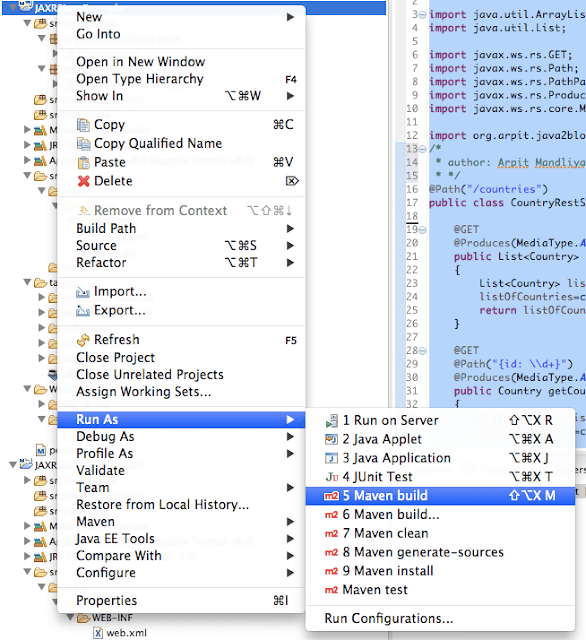
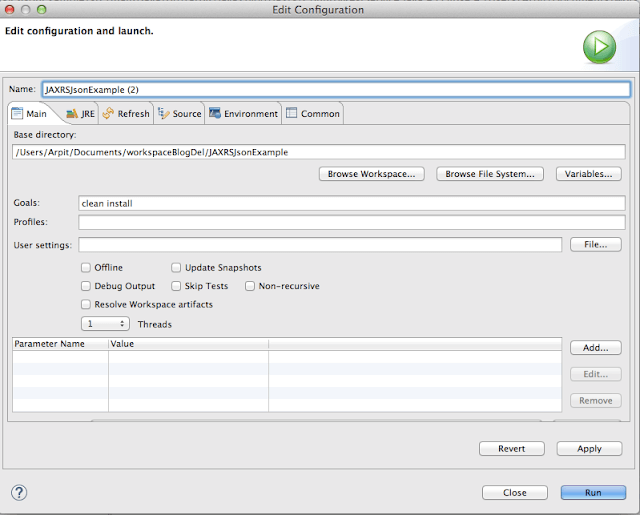
8) It ‘s time to do maven build.
Right click on project -> Run as -> Maven build
Run the application
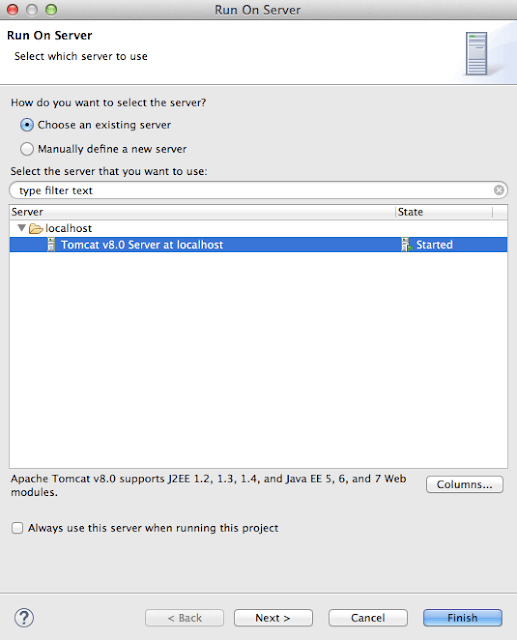
http://localhost:8080/SpringMVCSpringDataHibernateExample/getAllCountries
You will get below screen:
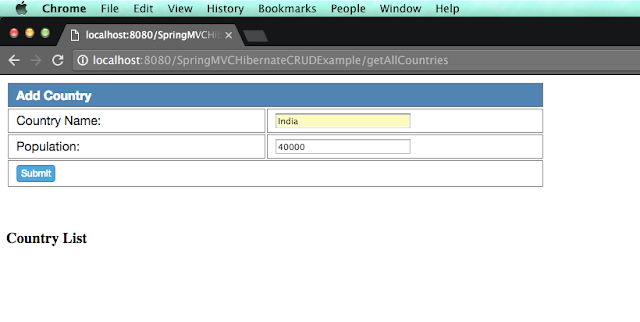
As you can see, we did not add any country to the list, so it is empty.
Lets add Country named India to country list and click submit.
Similarly we will add China , Bhutan and Nepal respectively and you will see below screen.
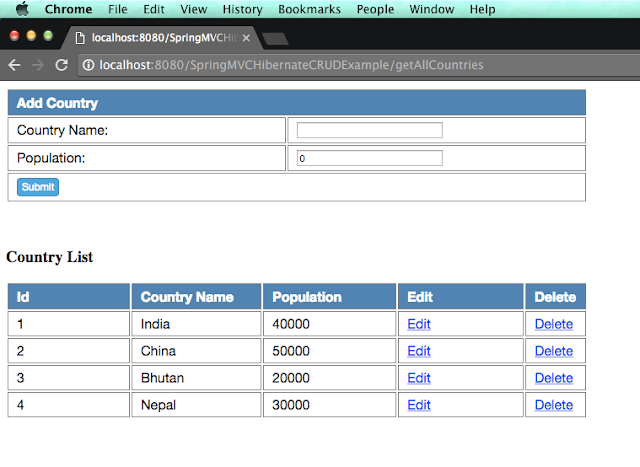
Lets edit population of Bhutan to 15000. Click on edit button corresponds to Bhutan.
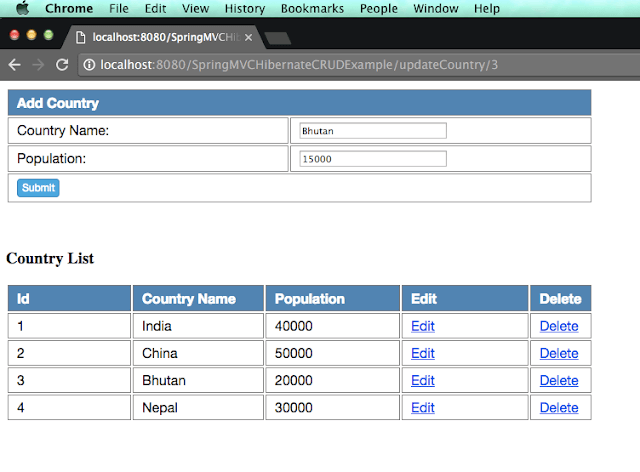
When you click on submit, you will get below screen.
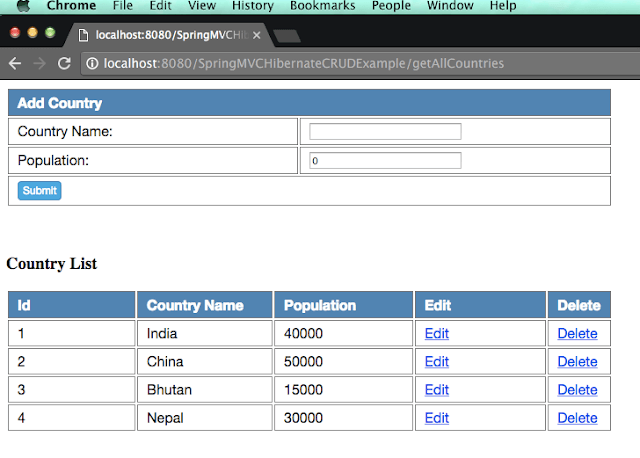
Lets delete country China from above list, click on delete button corresponds to 2nd row.
You will see below screen.
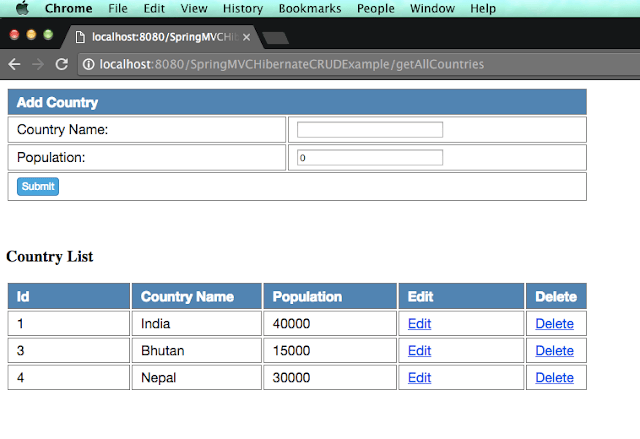
As you can see, china got deleted from above list.
Project structure
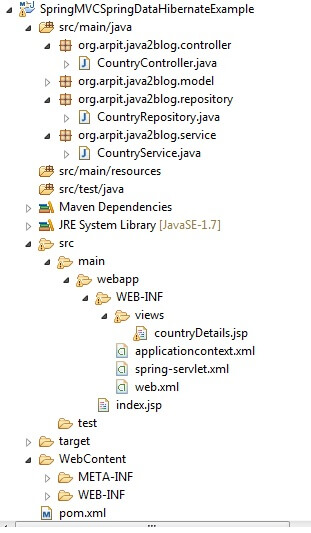
We are done with Spring MVC, Spring data hibernate MySQL CRUD example. If you are still facing any issue, please comment.
