
If you want to practice data structure and algorithm programs, you can go through 100+ java coding interview questions.
[toc]
Graph traversal Algorithms:
Breadth first search is graph traversal algorithm. In this algorithm, lets say we start with node i, then we will visit neighbours of i, then neighbours of neighbours of i and so on.
Algorithm:
Steps for Breadth first search:
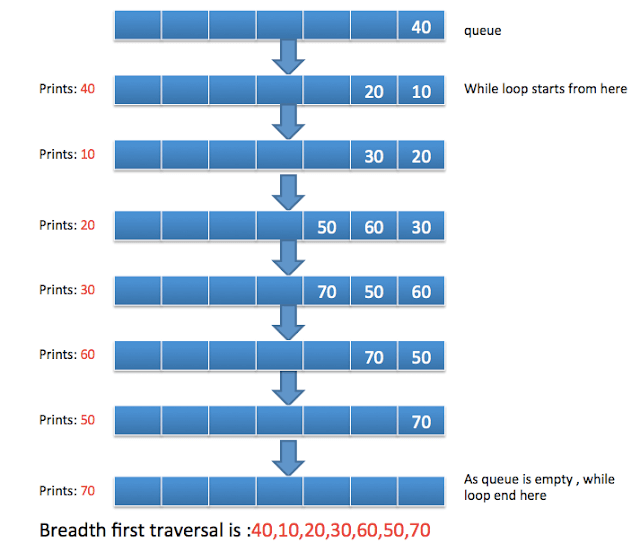
- Create empty queue and push root node to it.
- Do the following when queue is not empty
- Pop a node from queue and print it.
- Find neighbours of node with the help of adjacency matrix and check if node is already visited or not.
- Push neighbours of node into queue if not null
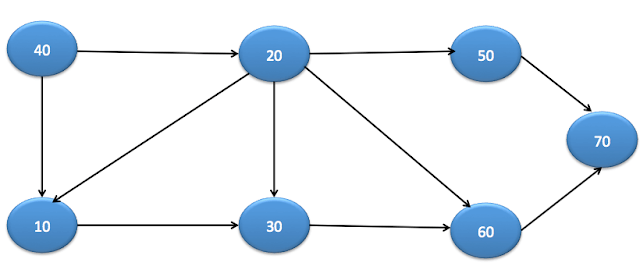
Lets understand with the help of example:
Lets say graph is:
Java BFS Example
There are two ways to represent a graph.
- Using Neighbours list
- Using Adjacency Matrix
Using Neighbours list
In this, you can have List<Node> as neighbours in Node class as below.
package org.arpit.java2blog.graph;

import java.util.ArrayList;
import java.util.LinkedList;
import java.util.List;
import java.util.Queue;

public class BreadthFirstSearchExampleNeighbourList
{

    private Queue<Node> queue;
    static ArrayList<Node> nodes=new ArrayList<Node>();
    static class Node
    {
        int data;
        boolean visited;
        List<Node> neighbours;

        Node(int data)
        {
            this.data=data;
            this.neighbours=new ArrayList<>();

        }
        public void addneighbours(Node neighbourNode)
        {
            this.neighbours.add(neighbourNode);
        }
        public List<Node> getNeighbours() {
            return neighbours;
        }
        public void setNeighbours(List<Node> neighbours) {
            this.neighbours = neighbours;
        }
    }

    public BreadthFirstSearchExampleNeighbourList()
    {
        queue = new LinkedList<Node>();
    }

    public void bfs(Node node)
    {
        queue.add(node);
        node.visited=true;
        while (!queue.isEmpty())
        {

            Node element=queue.remove();
            System.out.print(element.data + "t");
            List<Node> neighbours=element.getNeighbours();
            for (int i = 0; i < neighbours.size(); i++) {
                Node n=neighbours.get(i);
                if(n!=null && !n.visited)
                {
                    queue.add(n);
                    n.visited=true;

                }
            }

        }
    }

    public static void main(String arg[])
    {

        Node node40 =new Node(40);
        Node node10 =new Node(10);
        Node node20 =new Node(20);
        Node node30 =new Node(30);
        Node node60 =new Node(60);
        Node node50 =new Node(50);
        Node node70 =new Node(70);

        node40.addneighbours(node10);
        node40.addneighbours(node20);
        node10.addneighbours(node30);
        node20.addneighbours(node10);
        node20.addneighbours(node30);
        node20.addneighbours(node60);
        node20.addneighbours(node50);
        node30.addneighbours(node60);
        node60.addneighbours(node70);
        node50.addneighbours(node70);
        System.out.println("The BFS traversal of the graph is ");
        BreadthFirstSearchExampleNeighbourList bfsExample = new BreadthFirstSearchExampleNeighbourList();
        bfsExample.bfs(node40);

    }
}
When you run above program, you will get below output:
40 10 20 30 60 50 70
Using Adjacency Matrix
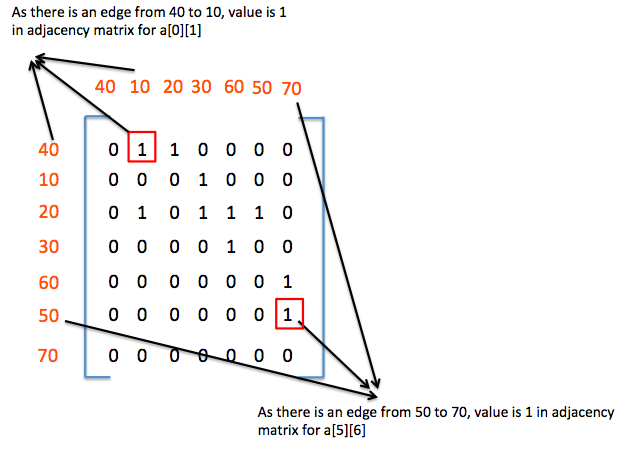
Adjacency_matrix is used to find the connection between two nodes.
if adjacency_matrix[i][j]==1, then nodes at index i and index j are connected
Below diagram will help you to understand adjacency matrix.
Create BreadthFirstSearchExample.java
package org.arpit.java2blog.graph;

import java.util.ArrayList;
import java.util.LinkedList;
import java.util.Queue;

public class BreadthFirstSearchExample
{

    private Queue<Node> queue;
    static ArrayList<Node> nodes=new ArrayList<Node>();
    static class Node
    {
        int data;
        boolean visited;

        Node(int data)
        {
            this.data=data;

        }
    }

    public BreadthFirstSearchExample()
    {
        queue = new LinkedList<Node>();
    }

    // find neighbors of node using adjacency matrix
    // if adjacency_matrix[i][j]==1, then nodes at index i and index j are connected
    public ArrayList<Node> findNeighbours(int adjacency_matrix[][],Node x)
    {
        int nodeIndex=-1;

        ArrayList<Node> neighbours=new ArrayList<Node>();
        for (int i = 0; i < nodes.size(); i++) {
            if(nodes.get(i).equals(x))
            {
                nodeIndex=i;
                break;
            }
        }

        if(nodeIndex!=-1)
        {
            for (int j = 0; j < adjacency_matrix[nodeIndex].length; j++) {
                if(adjacency_matrix[nodeIndex][j]==1)
                {
                    neighbours.add(nodes.get(j));
                }
            }
        }
        return neighbours;
    }

    public void bfs(int adjacency_matrix[][], Node node)
    {
        queue.add(node);
        node.visited=true;
        while (!queue.isEmpty())
        {

            Node element=queue.remove();
            System.out.print(element.data + "t");
            ArrayList<Node> neighbours=findNeighbours(adjacency_matrix,element);
            for (int i = 0; i < neighbours.size(); i++) {
                Node n=neighbours.get(i);
                if(n!=null && !n.visited)
                {
                    queue.add(n);
                    n.visited=true;

                }
            }

        }
    }

    public static void main(String arg[])
    {

        Node node40 =new Node(40);
        Node node10 =new Node(10);
        Node node20 =new Node(20);
        Node node30 =new Node(30);
        Node node60 =new Node(60);
        Node node50 =new Node(50);
        Node node70 =new Node(70);

        nodes.add(node40);
        nodes.add(node10);
        nodes.add(node20);
        nodes.add(node30);
        nodes.add(node60);
        nodes.add(node50);
        nodes.add(node70);
        int adjacency_matrix[][] = {
                {0,1,1,0,0,0,0}, // Node 1: 40
                {0,0,0,1,0,0,0}, // Node 2 :10
                {0,1,0,1,1,1,0}, // Node 3: 20
                {0,0,0,0,1,0,0}, // Node 4: 30
                {0,0,0,0,0,0,1}, // Node 5: 60
                {0,0,0,0,0,0,1}, // Node 6: 50
                {0,0,0,0,0,0,0}, // Node 7: 70
        };
        System.out.println("The BFS traversal of the graph is ");
        BreadthFirstSearchExample bfsExample = new BreadthFirstSearchExample();
        bfsExample.bfs(adjacency_matrix, node40);

    }
}
When you run above program, you will get below output:
The BFS traversal of the graph is
40 10 20 30 60 50 70
Please go through Algorithm Interview Programs in java for more such programs.
