
[toc]
Have you ever come across this stupid bug while coding: typeerror: can't multiply sequence by non-int of type 'float'? I can really feel your frustration when you encounter such bugs. That’s why I am going to make sure that you can resolve this error after reading this article.
Problem Formulation: Fixing typeerror: can't multiply sequence by non-int of type 'float' in Python.
💡 Example 1
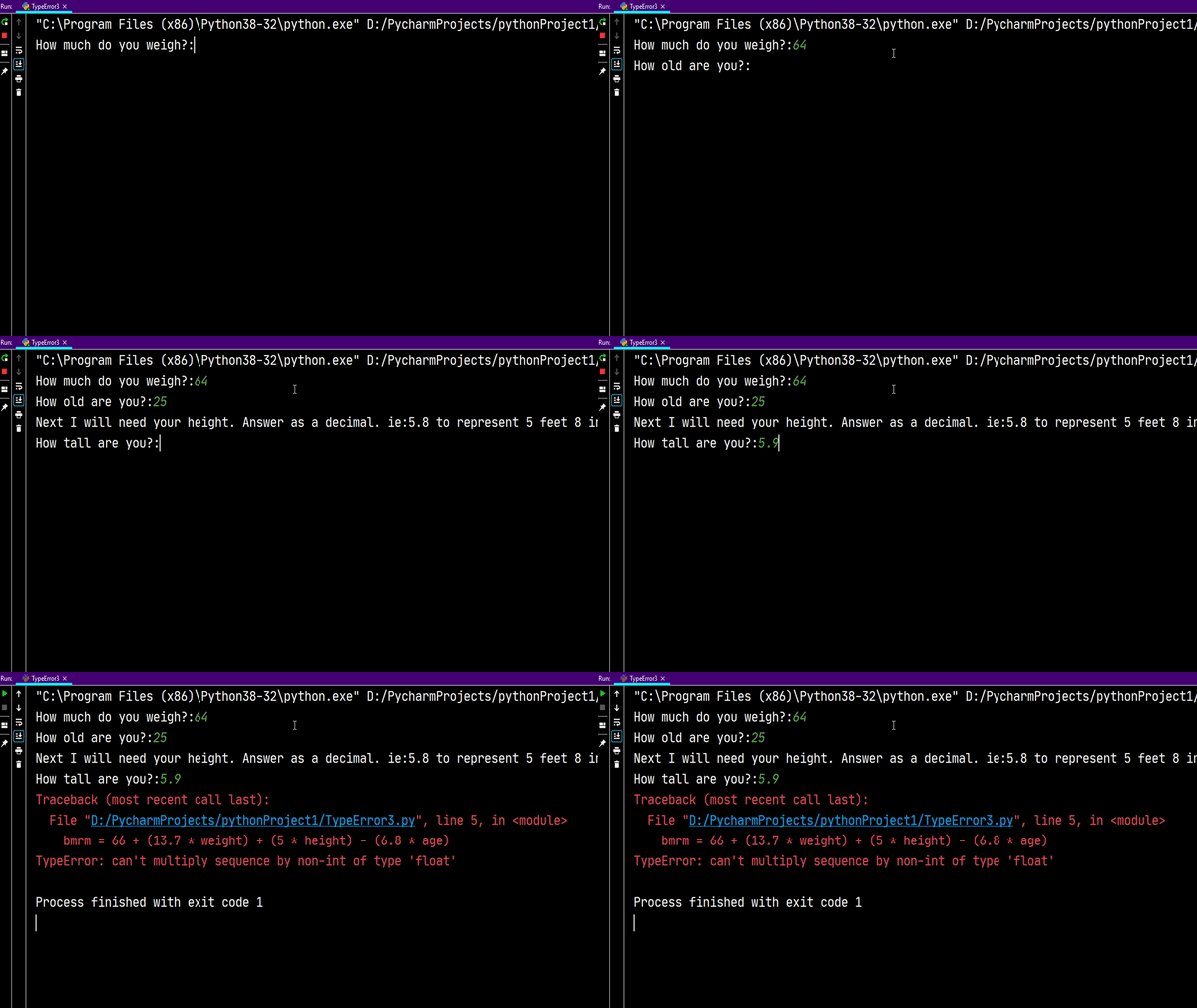
Aim: The following program accepts the required user inputs to calculate the BRM and BMRF values.
weight = input('How much do you weigh?:')
age = input('How old are you?:')
print('Next I will need your height. Answer as a decimal. ie:5.8 to represent 5 feet 8 inches')
height = input('How tall are you?:')
bmrm = 66 + (13.7 * weight) + (5 * height) - (6.8 * age)
bmrf = 65 + (9.6 * weight) + (1.8 * height) - (4.7 * age)
print('BMRM: ', bmrm)
print('BMRF: ', bmrf)
Output:
Reason of Error:
You can multiply strings in Python with integers to generate a repeating sequence, as shown below.
text = '*'
print(5 * text)
Output:
However, you cannot multiply float objects with strings in Python. This leads to the occurrence of TypeError: can't multiply sequence by non-int of type 'float'. Let us have a look at an example to verify this.
text = '*'
print(5.0 * text)
Output:
Please refer to this article to go through the causes of TypeError in Python.
If you have a look at the above example, you will notice that we are trying to calculate the bmrm value by multiplying a floating-point value with a string value. This is because input() function returns a string even if the user enters a number. Thus when a string is multiplied by a floating value it leads to the occurrence of TypeError: can’t multiply sequence by non-int of type ‘float’ in Python.
🖊 Solution: Convert String Input To Floating-Point Value
You can avoid the above TypeError by accepting a user input in the form of a floating-point value instead of a string.
Read User Input as Float in Python
You cannot take user input as a float directly. However, input string can be converted into a float value by using the float() function that returns a float value.
Consider the example given below:
value = float(input('Enter a decimal number: '))
print(25*value)
Output:
Now, let us implement the above concept and get rid of the bug in our program.
🖊 The Solution:
weight = float(input('How much do you weigh?:'))
age = float(input('How old are you?:'))
print('Next I will need your height. Answer as a decimal. ie:5.8 to represent 5 feet 8 inches')
height = float(input('How tall are you?:'))
bmrm = 66 + (13.7 * weight) + (5 * height) - (6.8 * age)
bmrf = 65 + (9.6 * weight) + (1.8 * height) - (4.7 * age)
print('BMRM: ', bmrm)
print('BMRF: ', bmrf)
Output:
How much do you weigh?:64
How old are you?:26
Next I will need your height. Answer as a decimal. ie:5.8 to represent 5 feet 8 inches. How tall are you?:5.8
BMRM: 795.0
BMRF: 567.64
💡 Example 2
Practice makes a man perfect!👨🔬 Hence, before we wrap up our discussion, let us have a look at another example to ensure you have a clear understanding of how to overcome TypeError: can't multiply sequence by non-int of type 'float'.
Problem: Write a program that takes an argument, that must be a numerical value (float or int). It should return a number that equals 3.14 times the entered value.
For example:
- When user input is “Hello”.
- Output:-
None
- Output:-
- When user input is 25.25.
- Output:- 79.285
Your Code:
num = input('Enter a decimal number: ')
print(num * 3.14)
Output:
Traceback (most recent call last):
File “D:/PycharmProjects/pythonProject1/demo.py”, line 2, in
print(num * 3.14)
TypeError: can’t multiply sequence by non-int of type ‘float’
🖊 Solution:
The obvious reason that lead to the occurrence of TypeError in your code was line 2 wherein you tried to multiply a string input with a floating point value.
- To avoid the error you must ensure that the user input is a float value.
- Secondly, you have to check if the type of value is a string or a numerical value.
num = input('Enter a decimal number: ')
try:
    print(float(num) * 3.0)
except:
    print("You have entered an Invalid Value!")
Output:
Enter a decimal number: 25.25
79.285
Explanation
- When the user input is a number, the
tryblock gets executed. Here, the user inputnumis type-casted to a floating-point value and multiplied by 3.14. - When user input is a string, the
exceptblock gets executed.
💡 Example 3
Until now you have seen that TypeError: can't multiply sequence by non-int of type 'float' occurs while multiplying a string with a float value. However, this error will appear every-time you try to multiply any sequential data-type (string, tuple or lists) and a floating point value.
Example:
li = [2,4,6,8] # list
tup = (1,2,3,4,5) # tuple
print(2.0*li)
print(2.0*tup)

# DESIRED OUTPUT:
# [2, 4, 6, 8, 2, 4, 6, 8]
# (1, 2, 3, 4, 5, 1, 2, 3, 4, 5)
Output:
TypeError: can’t multiply sequence by non-int of type ‘float’
🖊 Solution:
To avoid the error you have to convert the float value to an integer value as shown below.
li = [2,4,6,8] # list
tup = (1,2,3,4,5) # tuple
print(int(2.0)*li)
print(int(2.0)*tup)
Output:
Conclusion
Thus in this article we learned that TypeError: can't multiply sequence by non-int of type 'float' occurs when you try to multiply a string (list or tuple) and a floating-point value together. To solve this error you must ensure that the string values are converted to floating-point values before performing the multiplication.
I hope this article helped you. Please subscribe and stay tuned for more exciting articles in the future. Happy learning! 📚
