
In this tutorial, we will see about Spring @Profile annotation. This tutorial is an extension to Spring boot profile example.
Profile annotation represents named logical grouping may be activated via
- By using
ConfigurableEnvironment.setActiveProfiles(java.lang.String...) - By setting the
spring.profiles.activeproperty as a JVM system property, as an environment variable, or as a Servlet context parameter in web.xml for web applications. - You can also use
@ActiveProfiles< while doing integration testing
The @Profile annotation may be used in any of the following ways:
- As a type-level annotation on any class directly or indirectly annotated with @Component, including @Configuration classes
- As a meta-annotation, for the reason of composing custom stereotype annotations
- It can be used method-level annotation on any @Bean annotation
Let’s see with the help of an example.
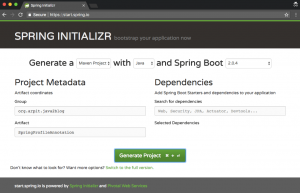
Step 1: Go to "https://start.spring.io/" and create spring boot projects as per below screenshot.
Step 2: Import the maven project in eclipse.
step 3: Create a package named "org.arpit.java2blog.model"
create a model class named "Customer.java"
package org.arpit.java2blog.model;

public class Customer {
        int id;
        String name;
        String email;

        public Customer(int id, String name, String email) {
            super();
            this.id = id;
            this.name = name;
            this.email = email;
        }

        public int getId() {
            return id;
        }
        public void setId(int id) {
            this.id = id;
        }
        public String getName() {
            return name;
        }
        public void setName(String name) {
            this.name = name;
        }
        public String getEmail() {
            return email;
        }
        public void setEmail(String email) {
            this.email = email;
        }

}
Step 4:Create a package named “org.arpit.java2blog.config”
create a config class named “ConfigurationDatabase.java”
package org.arpit.java2blog.config;

import org.arpit.java2blog.model.Customer;
import org.springframework.context.annotation.Bean;
import org.springframework.context.annotation.Configuration;
import org.springframework.context.annotation.Profile;

@Configuration
public class ConfigurationDatabase {

    @Profile("dev")
    @Bean(name="customer")
    public Customer getDevCustomer()
    {
        return new Customer(1,"John","[email protected]");
    }

    @Profile("prod")
    @Bean(name="customer")
    public Customer getProdCustomer()
    {
        return new Customer(1,"Martin","[email protected]");
    }

}
Step 5: Create test class named “SpringProfileAnnotationDevTest” in src/test/java.
package org.arpit.java2blog.SpringProfileAnnotation;

import static org.junit.Assert.assertEquals;
import static org.junit.Assert.assertNotNull;

import org.arpit.java2blog.config.ConfigurationDatabase;
import org.arpit.java2blog.model.Customer;
import org.junit.Test;
import org.junit.runner.RunWith;
import org.springframework.beans.factory.annotation.Autowired;
import org.springframework.boot.test.context.SpringBootTest;
import org.springframework.context.ApplicationContext;
import org.springframework.test.context.ActiveProfiles;
import org.springframework.test.context.ContextConfiguration;
import org.springframework.test.context.junit4.SpringRunner;
import org.springframework.test.context.support.AnnotationConfigContextLoader;

@RunWith(SpringRunner.class)
@SpringBootTest
@ActiveProfiles(value="dev")
@ContextConfiguration(classes= {ConfigurationDatabase.class},loader=AnnotationConfigContextLoader.class)
public class SpringProfileAnnotationDevTest {

    @Autowired
    private ApplicationContext applicationContext;

      @Test
      public void testDevDataSource() {
          Customer customer = (Customer)applicationContext.getBean("customer");
          assertNotNull(customer);
          assertEquals("John", customer.getName());
      }

}
Here
@SpringBootTest annotation is used to run Spring boot test.
@ContextConfiguration provides class-level metadata to determine how to load and configure an ApplicationContext for integration tests.
@ActiveProfiles is used to provide name of the profile which will be activated while running integration tests.
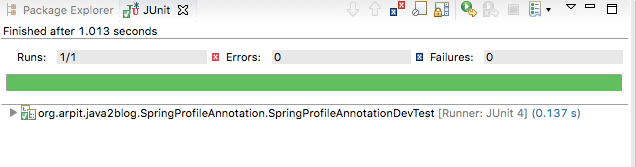
Step 6: Run the test
When you run above test, you will get below output:
Step 7:Create another test class named “SpringProfileAnnotationProdTest” in src/test/java.
create a class named “SpringBootHelloWorldApplication.java”
package org.arpit.java2blog.SpringProfileAnnotation;

import static org.junit.Assert.assertEquals;
import static org.junit.Assert.assertNotNull;

import org.arpit.java2blog.config.ConfigurationDatabase;
import org.arpit.java2blog.model.Customer;
import org.junit.Test;
import org.junit.runner.RunWith;
import org.springframework.beans.factory.annotation.Autowired;
import org.springframework.boot.test.context.SpringBootTest;
import org.springframework.context.ApplicationContext;
import org.springframework.test.context.ActiveProfiles;
import org.springframework.test.context.ContextConfiguration;
import org.springframework.test.context.junit4.SpringRunner;
import org.springframework.test.context.support.AnnotationConfigContextLoader;

@RunWith(SpringRunner.class)
@SpringBootTest
@ActiveProfiles(value="prod")
@ContextConfiguration(classes= {ConfigurationDatabase.class},loader=AnnotationConfigContextLoader.class)
public class SpringProfileAnnotationProdTest {

    @Autowired
    private ApplicationContext applicationContext;

      @Test
      public void testDevDataSource() {
          Customer customer = (Customer)applicationContext.getBean("customer");
          assertNotNull(customer);
          assertEquals("Martin", customer.getName());
      }
}
Step 8: Run the test
When you run above test, you will get below output:

As you can see, we are getting different bean based on active profile.
As we you can see we are getting name as “John” with @ActiveProfiles(value="dev") and “Martin in case of @ActiveProfiles(value="prod")
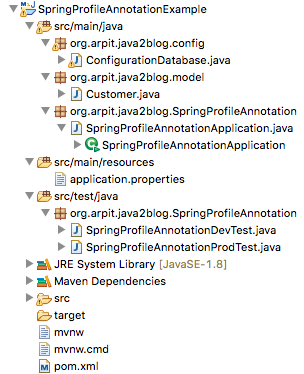
Project Structure
Source code
That’s all Spring profile annotation.
