
In this post, we will see Spring boot JDBC example.
As we already know Spring boot does lot of auto configurations which help us to avoid a lot of boilerplate code. In the case of JDBC, spring boot provides auto-configuration such as creating DataSource and JDBCTemplate objects automatically based on application.properties.
So you just need to autowire JdbcTemplate bean in your application code as below.
@Repository
public class StudentRepositoryImpl implements StudentRepository {

    // Just need to autowire JdbcTemplate, spring boot will
    // do auto configure
    @Autowired
    private JdbcTemplate jdbcTemplate;
Let’s create a simple Spring boot JDBC example.
[toc]
Tools used
- Spring Boot 2.2.2.RELEASE
- Spring JDBC 5.2.2.RELEASE
- HikariCP 3.4.1
- Maven 3
- Java 8
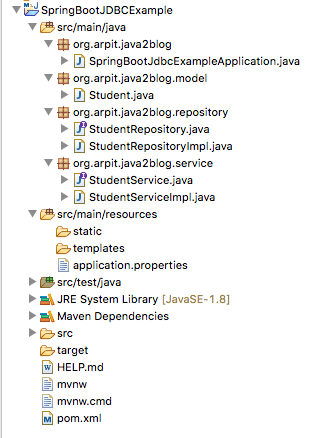
Project Structure
Create new Spring boot project
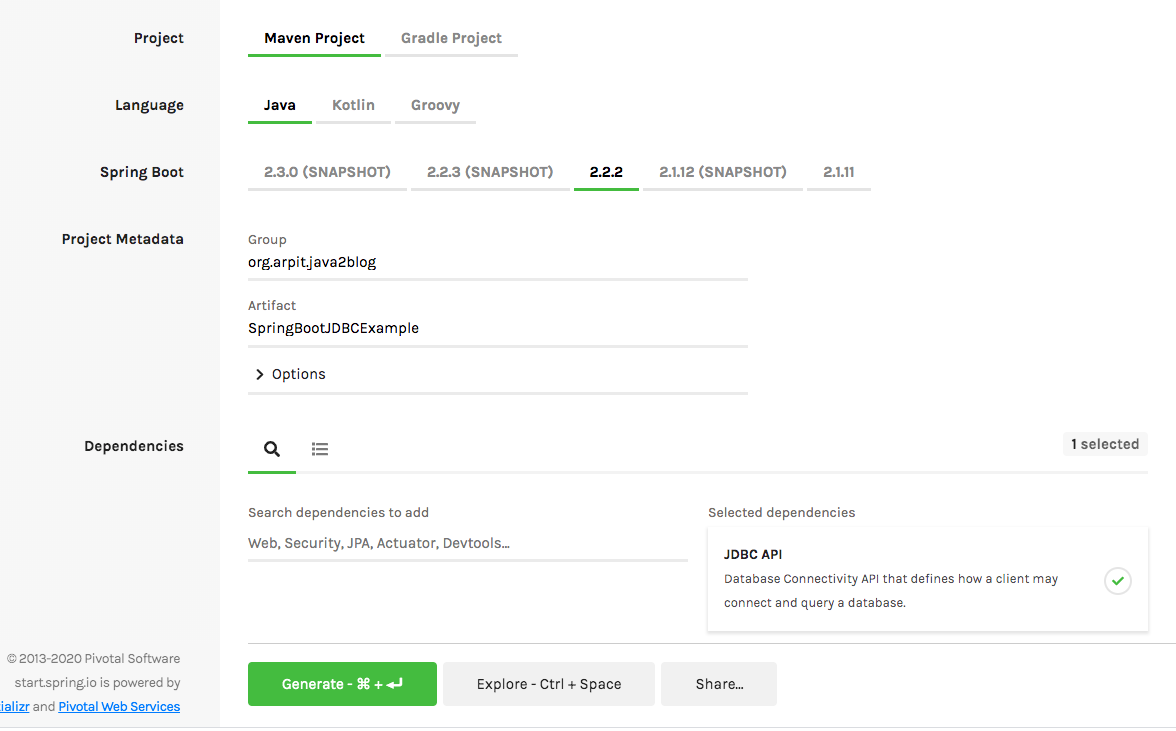
Step 1: Go to https://start.spring.io and create a project with following dependencies
- spring-boot-starter-jdbc
Here is the screenshot for the same.
Maven configuration
Add Mysql drive dependency
We need to add MySQL JDBC drive dependency in order to connect to Mysql.
<!-- MySQL JDBC driver -->
    <dependency>
        <groupId>mysql</groupId>
        <artifactId>mysql-connector-java</artifactId>
    </dependency>
Your pom.xml will look like below:
<?xml version="1.0" encoding="UTF-8"?>
<project xmlns="http://maven.apache.org/POM/4.0.0" xmlns:xsi="http://www.w3.org/2001/XMLSchema-instance"
    xsi:schemaLocation="http://maven.apache.org/POM/4.0.0 https://maven.apache.org/xsd/maven-4.0.0.xsd">
    <modelVersion>4.0.0</modelVersion>
    <parent>
        <groupId>org.springframework.boot</groupId>
        <artifactId>spring-boot-starter-parent</artifactId>
        <version>2.2.2.RELEASE</version>
        <relativePath/> <!-- lookup parent from repository -->
    </parent>
    <groupId>com.java2blog</groupId>
    <artifactId>SpringBootJDBCExample</artifactId>
    <version>0.0.1-SNAPSHOT</version>
    <name>SpringBootJDBCExample</name>
    <description>Demo project for Spring Boot</description>

    <properties>
        <java.version>1.8</java.version>
    </properties>

    <dependencies>
        <dependency>
            <groupId>org.springframework.boot</groupId>
            <artifactId>spring-boot-starter-data-jdbc</artifactId>
        </dependency>
        <dependency>
            <groupId>org.springframework.boot</groupId>
            <artifactId>spring-boot-starter-web</artifactId>
        </dependency>

        <dependency>
            <groupId>org.springframework.boot</groupId>
            <artifactId>spring-boot-starter-test</artifactId>
            <scope>test</scope>
            <exclusions>
                <exclusion>
                    <groupId>org.junit.vintage</groupId>
                    <artifactId>junit-vintage-engine</artifactId>
                </exclusion>
            </exclusions>
        </dependency>

        <dependency>
            <groupId>mysql</groupId>
            <artifactId>mysql-connector-java</artifactId>
        </dependency>
    </dependencies>

    <build>
        <plugins>
            <plugin>
                <groupId>org.springframework.boot</groupId>
                <artifactId>spring-boot-maven-plugin</artifactId>
            </plugin>
        </plugins>
    </build>

</project>
Configure datasource in Application.properties
#mysql properties
spring.datasource.url=jdbc:mysql://localhost:3306/StudentData
spring.datasource.username=root
spring.datasource.password=test1234
spring.datasource.platform=mysql
Please change your username and password as per your mysql local setup.
Create database table
Let’s create a database table named Students which we are going to use in this example.
CREATE TABLE STUDENTS (
id int(11) NOT NULL AUTO_INCREMENT,
studentName varchar(255) DEFAULT NULL,
age int(3) DEFAULT NULL,
PRIMARY KEY (id)
);
Create model class
Let’s create simple Student.java.
package org.arpit.java2blog.model;

public class Student {

    private int studentId;
    private String studentName;
    private int age;

    public Student(int studentId, String studentName, int age) {
        super();
        this.studentId = studentId;
        this.studentName = studentName;
        this.age = age;
    }

    public int getStudentId() {
        return studentId;
    }

    public void setStudentId(int studentId) {
        this.studentId = studentId;
    }

    public String getStudentName() {
        return studentName;
    }

    public void setStudentName(String studentName) {
        this.studentName = studentName;
    }

    public int getAge() {
        return age;
    }

    public void setAge(int age) {
        this.age = age;
    }

    @Override
    public String toString() {
        return "Student [studentId=" + studentId + ", StudentName=" + studentName + ",age =" + age + "]";
    }
}
Create Repository interface and implementation
package org.arpit.java2blog.repository;

import java.util.List;
import java.util.Optional;

import org.arpit.java2blog.model.Student;

public interface StudentRepository{

    int save(Student student);

    int update(Student student);

    int deleteById(int id);

    List findAll();

    Optional findById(Long id);

}
Create its implemntation named StudentRepositoryImpl.java
package org.arpit.java2blog.repository;

import java.util.List;
import java.util.Optional;

import org.arpit.java2blog.model.Student;
import org.springframework.beans.factory.annotation.Autowired;
import org.springframework.jdbc.core.JdbcTemplate;
import org.springframework.stereotype.Repository;

@Repository
public class StudentRepositoryImpl implements StudentRepository {

    // Just need to autowire JdbcTemplate, spring boot will
    // do auto configure
    @Autowired
    private JdbcTemplate jdbcTemplate;

    @Override
    public int save(Student student) {
        return jdbcTemplate.update(
                "insert into students (studentName, age) values(?,?)",
                student.getStudentName(), student.getAge());
    }

    @Override
    public int update(Student student) {
        return jdbcTemplate.update(
                "update students set age = ? where id = ?",
                student.getAge(), student.getStudentId());
    }

    @Override
    public int deleteById(int id) {
        return jdbcTemplate.update(
                "delete from students where id = ?",
                id);
    }

    @Override
    public List findAll() {
        return jdbcTemplate.query(
                "select * from students",
                (rs, rowNum) ->
                        new Student(
                                rs.getInt("id"),
                                rs.getString("studentName"),
                                rs.getInt("age")
                        )
        );
    }

    @Override
    public Optional findById(Long id) {
        return jdbcTemplate.queryForObject(
                "select * from students where id = ?",
                new Object[]{id},
                (rs, rowNum) ->
                        Optional.of(new Student(
                                rs.getInt("id"),
                                rs.getString("studentName"),
                                rs.getInt("age")
                        ))
        );
    }
}
We have use Spring’s JDBCTemplate to interact with database. JDBCTemplate helps us to avoid boiler plate code and provides convenient methods to retrieve and insert data in database.
Create service interface and implementation
Create a service interface StudentService.java
package org.arpit.java2blog.service;

import java.util.List;
import java.util.Optional;

import org.arpit.java2blog.model.Student;

public interface StudentService {

    int save(Student student);

    int update(Student student);

    int deleteById(int id);

    List findAll();

    Optional findById(Long id);

}
Create its implementation named StudentRepositoryImpl.java
package org.arpit.java2blog.service;

import java.util.List;
import java.util.Optional;

import org.arpit.java2blog.model.Student;
import org.arpit.java2blog.repository.StudentRepository;
import org.springframework.beans.factory.annotation.Autowired;
import org.springframework.stereotype.Service;

@Service
public class StudentServiceImpl implements StudentService{

    @Autowired
    StudentRepository studentRepository;

    @Override
    public int save(Student student) {
        return studentRepository.save(student);
    }

    @Override
    public int update(Student student) {
        return studentRepository.update(student);
    }

    @Override
    public int deleteById(int id) {
        return studentRepository.deleteById(id);
    }

    @Override
    public List findAll() {
        return studentRepository.findAll();
    }

    @Override
    public Optional findById(Long id) {
        return studentRepository.findById(id);
    }

}
Please note that we have annotated StudentServiceImpl with @Service. Spring will automatically create a bean based on this annotation.
StudentRepository is being injected into StudentServiceImpl class and StudentServiceImpl is delegating all CRUD operatons to StudentRepository which actually interacts with database with Spring JDBCTemplate.
Create Application class
package org.arpit.java2blog;

import java.util.Arrays;
import java.util.List;

import org.arpit.java2blog.model.Student;
import org.arpit.java2blog.service.StudentService;
import org.springframework.beans.factory.annotation.Autowired;
import org.springframework.boot.CommandLineRunner;
import org.springframework.boot.SpringApplication;
import org.springframework.boot.autoconfigure.SpringBootApplication;

@SpringBootApplication
public class SpringBootJdbcExampleApplication implements CommandLineRunner{

    @Autowired
    StudentService studentService;

    public static void main(String[] args) {
        SpringApplication.run(SpringBootJdbcExampleApplication.class, args);
    }

    @Override
    public void run(String... args) {
        System.out.println("StartApplication...");
        testStudentData();
    }

    void testStudentData() {

        List students = Arrays.asList(
                new Student(1,"John", 16),
                new Student(2,"Martin", 18),
                new Student(3,"Mary",  20),
                new Student(4,"Ricky", 15)
        );

        System.out.println("[SAVE]");
        students.forEach(student -> {
            System.out.println("Saving student with name: "+student.getStudentName() );
            studentService.save(student);
        });

        // find all
        System.out.println("get All students: "+studentService.findAll());

        // find by id
        System.out.println("Find Student with id 2");
        Student student = studentService.findById(2L).orElseThrow(IllegalArgumentException::new);
        System.out.println("Student with id 2: "+student);

        // update
        System.out.println("Update age of Martin to 19");
        student.setAge(19);
        System.out.println("Rows affected: "+studentService.update(student));

        // delete
        System.out.println("Delete Student with id 4");
        System.out.println("Rows affected: "+ studentService.deleteById(4));

        // find all
        System.out.println("get updated list of Students: "+studentService.findAll());
    }
}
we have injected StudentService class in SpringBootJdbcExampleApplication and use StudentService to do the CRUD operation here.
In testStudentData(), we have create 4 student objects and performed CRUD operation with the help of StudentService methods.
Run the application
When you will run the application, you will get below output:
[SAVE]
Saving student with name: John
2019-12-25 00:09:09.183 INFO 18336 — [ main] com.zaxxer.hikari.HikariDataSource : HikariPool-1 – Starting…
2019-12-25 00:09:10.190 INFO 18336 — [ main] com.zaxxer.hikari.HikariDataSource : HikariPool-1 – Start completed.
Saving student with name: Martin
Saving student with name: Mary
Saving student with name: Ricky
get All students: [Student [studentId=1, StudentName=John,age =16], Student [studentId=2, StudentName=Martin,age =18], Student [studentId=3, StudentName=Mary,age =20], Student [studentId=4, StudentName=Ricky,age =15]]
Find Student with id 2
Student with id 2: Student [studentId=2, StudentName=Martin,age =18]
Update age of Martin to 19
Rows affected: 1
Delete Student with id 4
Rows affected: 1
get updated list of Students: [Student [studentId=1, StudentName=John,age =16], Student [studentId=2, StudentName=Martin,age =19], Student [studentId=3, StudentName=Mary,age =20]]
Verify database output
Let’s run the query to datbase and check if our changes are reflected in Students table
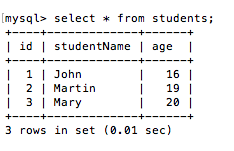
As you can see, tables shows updated data after performing CRUD operations.
