
If you want to practice data structure and algorithm programs, you can go through 100+ java coding interview questions.
1. Introduction
2. What are Leaf Nodes?
Leaf nodes are the nodes which don’t have any children. These are also terminal nodes and denote the end of the tree structure.
3. Implementation
There are two ways to count leaf nodes in a binary tree:
- Recursive
- Iterative
4.1 Recursive Solution
The recursive solution is very straightforward. Here are the steps for counting the number of leaf nodes:
  // Recursive Solution
	// print leaf nodes
	public static void printLeafNodes(TreeNode node) {

		if(node==null)
			return;

		if(node.left == null && node.right == null) {
			System.out.printf("%d ",node.data);
		}
		printLeafNodes(node.left);
		printLeafNodes(node.right);
	}
The time complexity for the recursive approach is O(n), where n is the number of nodes in the binary tree. This is because each node in the tree is visited to determine whether it is a leaf node or not.
The space complexity of Level Order traversal is O(w) where w is the maximum width in the binary tree. This is because the maximum number of nodes in the queue is proportional to the width of the binary tree at any point in time.
4.2 Iterative Solution
For recursion, we use an implicit stack. So here, to convert the recursive solution to iterative, we will use an explicit stack.
Steps for the iterative solution:
- Create an empty
stackand push the root node to it. - Do the following when the
stackis not empty:- Pop a node from the
stackand check if it is a leaf node. If yes, print the node. - Push the
right childof the popped node to thestack. - Push the
left childof the popped node to the stack.
- Pop a node from the
We are pushing the right child first, so it will be processed after the left subtree as the Stack is LIFO (Last In, First Out).
void printLeavesIterative(TreeNode root) {
    if (root == null) return;

    Stack stack = new Stack<>();
    stack.push(root);

    while (!stack.isEmpty()) {
        TreeNode current = stack.pop();
        if (current.left == null && current.right == null) {
            System.out.printf("%d ",current.data);
        }
        if (current.right != null) {
            stack.push(current.right);
        }
        if (current.left != null) {
            stack.push(current.left);
        }
    }
}
5. Complete Java Program
Let’s say our binary tree is:
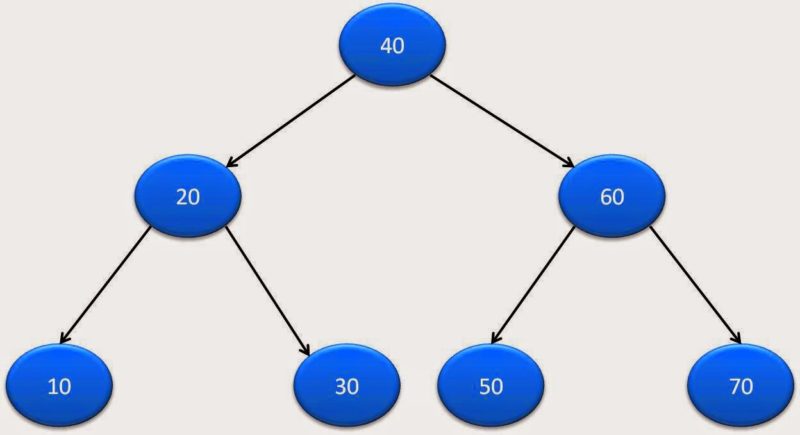
Here is complete java program for printing leaf nodes:
package org.arpit.java2blog.generic;

import java.util.Stack;

public class BinaryTreePrintLeafNodes {

    public static class TreeNode
    {
        int data;
        TreeNode left;
        TreeNode right;
        TreeNode(int data)
        {
            this.data=data;
        }
    }

    // Recursive Solution
    // print leaf nodes
    public static void printLeafNodes(TreeNode node) {

        if(node==null)
            return;

        if(node.left == null && node.right == null) {
            System.out.printf("%d ",node.data);
        }
        printLeafNodes(node.left);
        printLeafNodes(node.right);
    }

    public static void printLeavesIterative(TreeNode root) {
        if (root == null) return;

        Stack stack = new Stack<>();
        stack.push(root);

        while (!stack.isEmpty()) {
            TreeNode current = stack.pop();
            if (current.left == null && current.right == null) {
                System.out.printf("%d ",current.data);
            }
            if (current.right != null) {
                stack.push(current.right);
            }
            if (current.left != null) {
                stack.push(current.left);
            }
        }
    }

    public static void main(String[] args)
    {
        // Creating a binary tree
        TreeNode rootNode=createBinaryTree();
        System.out.println("Printing leaf nodes in binary tree(Recursive) :");
        printLeafNodes(rootNode);
        System.out.println("\nPrinting leaf nodes in binary tree(Iterative) :");
        printLeavesIterative(rootNode);

    }

    public static TreeNode createBinaryTree()
    {

        TreeNode rootNode =new TreeNode(40);
        TreeNode node20=new TreeNode(20);
        TreeNode node10=new TreeNode(10);
        TreeNode node30=new TreeNode(30);
        TreeNode node60=new TreeNode(60);
        TreeNode node50=new TreeNode(50);
        TreeNode node70=new TreeNode(70);

        TreeNode node5=new TreeNode(5);
        TreeNode node55=new TreeNode(55);

        rootNode.left=node20;
        rootNode.right=node60;

        node20.left=node10;
        node20.right=node30;

        node60.left=node50;
        node60.right=node70;

        node10.left=node5;
        node50.right=node55;
        return rootNode;
    }
}
Run above program and you will get following output:
Printing leaf nodes in binary tree(Recursive) :
5 30 55 70
Printing leaf nodes in binary tree(Iterative) :
5 30 55 70
6. Conclusion
In this article, we covered about how to print leaf nodes in Binary tree. We have discussed two approaches: Iterative and Recursive. We also discussed about time and space complexity for the same.
Java Binary tree tutorial:
- Binary tree in java
- Binary tree preorder traversal
- Binary tree postorder traversal
- Binary tree inorder traversal
- Binary tree level order traversal
- Binary tree spiral order traversal
- Binary tree reverse level order traversal
- Binary tree boundary traversal
- Print leaf nodes of binary tree
- Count leaf nodes in binary tree
- get maximum element in binary tree
- Print all paths from root to leaf in binary tree
- Print vertical sum of binary tree in java
- Get level of node in binary tree in java
- Lowest common ancestor(LCA) in binary tree in java
