
This is 5 of 8 parts of tutorial series
Tutorial Content:
- Introduction to hibernate framework
- Hibernate hello world example in eclipse
- Difference between openSession and getCurrentSession
- Hibernate one to one mapping example
- Hibernate one to many mapping example
- Hibernate many to many mapping example
- Hibernate inheritance:Table per class hierarchy
- Hibernate inheritance:table per subclass
- Hibernate inheritance:Table per concrete class
- Difference between openSession and getCurrentSession
- Difference between get and load
- Spring MVC Hibernate MySQL CRUD example
- Spring Rest hibernate example
In this example we will see how to implement many to many relationship using annotations.
Lets take example of Country and Language.One Country can have n number of languages and one language can be spoken by n number of countries.Following is relationship diagram among them.

Now to create above tables in database, you need to create two java files i.e. Country.java and Language.java.
1.Country.java
Country class will be used to create COUNTRY table in database.
Create Country.java in src->org.arpit.javapostsforlearning.
package org.arpit.javapostsforlearning;
import java.util.ArrayList;
import java.util.Collection;
import javax.persistence.CascadeType;
import javax.persistence.Column;
import javax.persistence.Entity;
import javax.persistence.GeneratedValue;
import javax.persistence.Id;
import javax.persistence.JoinColumn;
import javax.persistence.JoinTable;
import javax.persistence.ManyToMany;
import javax.persistence.Table;

@Entity
@Table(name="COUNTRY")
public class Country {

 @Id
 @GeneratedValue
 @Column(name="Country_Id")
 int countryId;

 @Column(name="Country_Name")
    String countryName ;

 @ManyToMany(cascade=CascadeType.ALL)
 @JoinTable(name="COUNTRY_LANGUAGE",joinColumns={@JoinColumn(name="Country_Id")},inverseJoinColumns={@JoinColumn(name="Language_Id")})
 Collection languages=new ArrayList();

 public Country()
 {

 }
    public Country(String countryName) {
  this.countryName=countryName;
 }

 public String getCountryName() {
        return countryName;
    }

    public void setCountryName(String countryName) {
        this.countryName = countryName;
    }

 public Collection getLanguages() {
  return languages;
 }

 public void setLanguages(ArrayList languages) {
  this.languages = languages;
 }
}
The @MamyToMany annotation is used to create the many-to-many relationship between the Country and Language entities. The @JoinTable annotation is used to create the COUNTRY_LANGUAGE link table and @JoinColumn annotation is used to refer the linking columns in both the tables.
2.Langauge.java
Language class will be used to create LANGUAGE table in database.
Create Langauge.java in src->org.arpit.javapostsforlearning.
package org.arpit.javapostsforlearning;import javax.persistence.Column;
import java.util.ArrayList;
import java.util.Collection;
import javax.persistence.Column;
import javax.persistence.Entity;
import javax.persistence.GeneratedValue;
import javax.persistence.Id;
import javax.persistence.ManyToMany;
import javax.persistence.Table;

@Entity
@Table(name="LANGUAGE")
public class Language {

 @Id
 @GeneratedValue
 @Column(name="Language_Id")
 int languageId;

 @Column(name="Language_Name")
 String languageName;

 @ManyToMany(mappedBy="languages")
 Collection languageSpeakingCountries=new ArrayList();

 public Language()
 {

 }
 public Language(String languageName) {
  this.languageName=languageName;
 }

 public String getLanguageName() {
  return languageName;
 }

 public void setLanguageName(String languageName) {
  this.languageName = languageName;
 }

 public Collection getLanguageSpeakingCountries() {
  return languageSpeakingCountries;
 }

 public void setLanguageSpeakingCountries(ArrayList languageSpeakingCountries) {
  this.languageSpeakingCountries = languageSpeakingCountries;
 }
}
3.Hiberante.cfg.xml:
Create a file named “hibernate.cfg.xml” in src folder.
        com.microsoft.sqlserver.jdbc.SQLServerDriver
        jdbc:sqlserver://localhost:1433;database=UserInfo
        sa


        1


        org.hibernate.dialect.SQLServer2005Dialect


        thread


        org.hibernate.cache.NoCacheProvider


        true


        create
4.Main Class:
package org.arpit.javapostsforlearning;

import org.hibernate.Session;
import org.hibernate.SessionFactory;
import org.hibernate.cfg.Configuration;
import org.hibernate.service.ServiceRegistry;
import org.hibernate.service.ServiceRegistryBuilder;

public class HibernateMain {

 public static void main(String[] args) {

  Country country=new Country("India");

  Language hindiLan=new Language("Hindi");
  hindiLan.getLanguageSpeakingCountries().add(country);

  Language engLan=new Language("English");
  engLan.getLanguageSpeakingCountries().add(country);

  country.getLanguages().add(hindiLan);
  country.getLanguages().add(engLan);

  Configuration configuration=new Configuration();
  configuration.configure();
  ServiceRegistry sr= new ServiceRegistryBuilder().applySettings(configuration.getProperties()).buildServiceRegistry();
  SessionFactory sf=configuration.buildSessionFactory(sr);
  Session ss=sf.openSession();

  ss.beginTransaction();
  ss.save(country);
  ss.getTransaction().commit();
  ss.close();

 }
}
Project Struture:

5.Run it:
When you run it,you will get following output.
Hibernate: create table COUNTRY (Country_Id int identity not null, Country_Name varchar(255), primary key (Country_Id))
Hibernate: create table COUNTRY_LANGUAGE (Country_Name int not null, Language_Name int not null)
Hibernate: create table LANGUAGE (Language_Id int identity not null, Language_Name varchar(255), primary key (Language_Id))
Hibernate: alter table COUNTRY_LANGUAGE add constraint FK67645601403CB4F4 foreign key (Language_Name) references LANGUAGE
Hibernate: alter table COUNTRY_LANGUAGE add constraint FK6764560165CEDD60 foreign key (Country_Name) references COUNTRY
Feb 03, 2013 12:07:59 AM org.hibernate.tool.hbm2ddl.SchemaExport execute
INFO: HHH000230: Schema export complete
Hibernate: insert into COUNTRY (Country_Name) values (?)
Hibernate: insert into LANGUAGE (Language_Name) values (?)
Hibernate: insert into LANGUAGE (Language_Name) values (?)
Hibernate: insert into COUNTRY_LANGUAGE (Country_Name, Language_Name) values (?, ?)
Hibernate: insert into COUNTRY_LANGUAGE (Country_Name, Language_Name) values (?, ?)
5.SQL output:
COUNTRY table in database

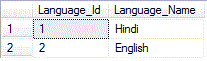
LANGUAGE table in database
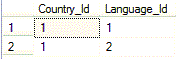
COUNTRY_LANGUAGE table is created to link above two tables.
Source code:
Source:Download without jars files
Source + lib: Download with jar files
