In this post,we will see how can we read and write JSON using json.simple.
Java JSON Tutorial Content:
- JSON Introduction
- JSON.simple example-read and write JSON
- GSON example-read and write JSON
- Jackson example – read and write JSON
- Jackson Streaming API – read and write JSON
JSON.simple, is a simple Java library for JSON processing, read and write JSON data and full compliance with JSON specification (RFC4627).
In this post,we will read and write JSON using JSON.simple.
Download JSON.simple jar from here.
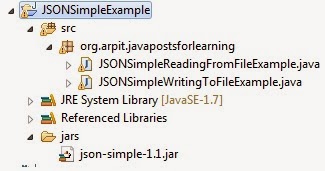
Create a java project named “JSONSimpleExample”
Create a folder jars and paste downloaded jar json-simple-1.1.1.jar.
right click on project->Property->java build path->Add jars and then go to src->jars->json-simple-1.1.1.jar.
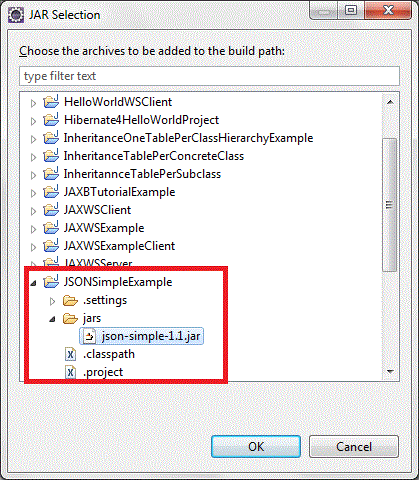
Click on ok.
Then you will see json-simple-1.1 jar added to your libraries and then click on ok

Write JSON to file:
Create a new class named “JSONSimpleWritingToFileExample.java” in src->org.arpit.java2blog
package org.arpit.java2blog;

import java.io.File;
import java.io.FileWriter;
import java.io.IOException;

import org.json.simple.JSONArray;
import org.json.simple.JSONObject;

/*
 * @Author : Arpit Mandliya
 */
public class JSONSimpleWritingToFileExample {

    public static void main(String[] args) {

        JSONObject countryObj = new JSONObject();
        countryObj.put("Name", "India");
        countryObj.put("Population", new Integer(1000000));

        JSONArray listOfStates = new JSONArray();
        listOfStates.add("Madhya Pradesh");
        listOfStates.add("Maharastra");
        listOfStates.add("Rajasthan");

        countryObj.put("States", listOfStates);

        try {

            // Writing to a file
            File file=new File("E:CountryJSONFile.json");
            file.createNewFile();
            FileWriter fileWriter = new FileWriter(file);
            System.out.println("Writing JSON object to file");
            System.out.println("-----------------------");
            System.out.print(countryObj);

            fileWriter.write(countryObj.toJSONString());
            fileWriter.flush();
            fileWriter.close();

        } catch (IOException e) {
            e.printStackTrace();
        }

    }
}
Run above program and you will get following output:
Writing JSON object to file
----------------------------
{"Name":"India","Population":1000000,"States":["Madhya Pradesh","Maharastra","Rajasthan"]}
Read JSON to file:
Here we will read above created JSON file.
Create a new class named “JSONSimpleReadingFromFileExample.java” in src->org.arpit.java2blog
package org.arpit.java2blog;

import java.io.FileNotFoundException;
import java.io.FileReader;
import java.io.IOException;
import java.util.Iterator;
import org.json.simple.JSONArray;
import org.json.simple.JSONObject;
import org.json.simple.parser.JSONParser;
import org.json.simple.parser.ParseException;
/*
 * @Author : Arpit Mandliya
 */
public class JSONSimpleReadingFromFileExample {

 public static void main(String[] args) {

  JSONParser parser = new JSONParser();

  try {

   Object obj = parser.parse(new FileReader("E:CountryJSONFile.json"));

   JSONObject jsonObject = (JSONObject) obj;

   String nameOfCountry = (String) jsonObject.get("Name");
   System.out.println("Name Of Country: "+nameOfCountry);

   long population = (Long) jsonObject.get("Population");
   System.out.println("Population: "+population);

   System.out.println("States are :");
   JSONArray listOfStates = (JSONArray) jsonObject.get("States");
   Iterator iterator = listOfStates.iterator();
   while (iterator.hasNext()) {
    System.out.println(iterator.next());
   }

  } catch (FileNotFoundException e) {
   e.printStackTrace();
  } catch (IOException e) {
   e.printStackTrace();
  } catch (ParseException e) {
   e.printStackTrace();
  }

 }
}
Run above program and you will get following output:
Reading JSON from a file
----------------------------
Name Of Country: India
Population: 1000000
States are :
Madhya Pradesh
Maharastra
Rajasthan
Project Structure: