
In this post,we will see how can we read and write JSON using GSON.
Java JSON Tutorial Content:
- JSON Introduction
- JSON.simple example-read and write JSON
- GSON example-read and write JSON
- Jackson example – read and write JSON
- Jackson Streaming API – read and write JSON
reading and writing JSON using json-simple.We will use another way(i.e. GSON) of reading JSON.
Gson is a Java library that can be used to convert Java Objects into their JSON representation. It can also be used to convert a JSON string to an equivalent Java object. Gson can work with arbitrary Java objects including pre-existing objects that you do not have source-code of.
There are various goals or advantages of using GSON(taken from GSON offcial page)
- Provide simple toJson() and fromJson() methods to convert Java objects to JSON and vice-versa
- Allow pre-existing unmodifiable objects to be converted to and from JSON
- Extensive support of Java Generics
- Allow custom representations for objects
- Support arbitrarily complex objects (with deep inheritance hierarchies and extensive use of generic types)
Reading and writing JSON using GSON is very easy.You can use these two methods:
toJSON() : It will convert simple pojo object to JSON string.
FromJSON() : It will convert JSON string to pojo object.
In this post,we will read and write JSON using GSON.
Download gson-2.2.4 jar from here.
Create a java project named “GSONExample”
Create a folder jars and paste downloaded jar gson-2.2.4.jar.
right click on project->Property->java build path->Add jars and then go to src->jars->gson-2.2.4.jar.
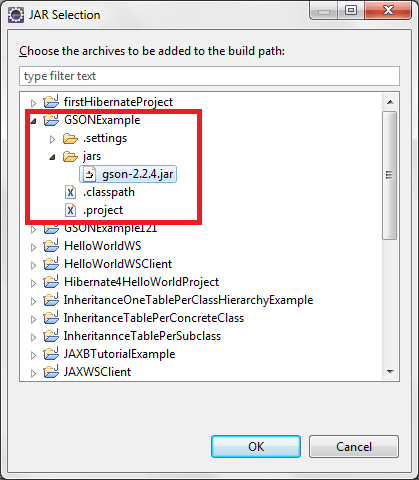
Click on ok.
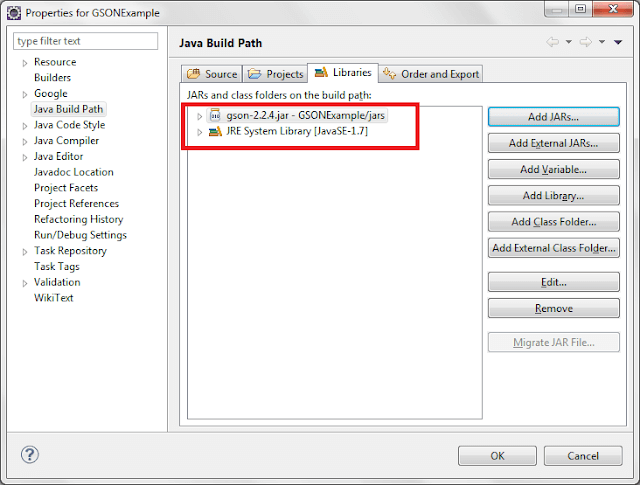
Then you will see json-simple-1.1 jar added to your libraries and then click on ok
First create a pojo named “Country.java”
package org.arpit.java2blog.pojo;

import java.util.ArrayList;
import java.util.List;

public class Country {

    String name;
    int population;
    private List listOfStates;

    //getter and setter methods

    public String getName() {
        return name;
    }

    public void setName(String name) {
        this.name = name;
    }

    public int getPopulation() {
        return population;
    }

    public void setPopulation(int population) {
        this.population = population;
    }

    public List getListOfStates() {
        return listOfStates;
    }

    public void setListOfStates(List listOfStates) {
        this.listOfStates = listOfStates;
    }

}
Write JSON to file:
Create a new class named “GSONWritingToFileExample.java” in src->org.arpit.java2blog
package org.arpit.java2blog;

import java.io.FileWriter;
import java.io.IOException;
import java.util.ArrayList;
import java.util.List;
import org.arpit.java2blog.pojo.Country;
import com.google.gson.Gson;

/*
 * @Author : Arpit Mandliya
 */
public class GSONWritingToFileExample {

 public static void main(String[] args) {

  Country countryObj=new Country();
  countryObj.setName("India");
  countryObj.setPopulation(1000000);
  List listOfStates=new ArrayList();
  listOfStates.add("Madhya Pradesh");
  listOfStates.add("Maharastra");
  listOfStates.add("Rajasthan");

  countryObj.setListOfStates(listOfStates);
  Gson gson = new Gson();

  // convert java object to JSON format,
  // and returned as JSON formatted string
  String json = gson.toJson(countryObj);

  try {
   //write converted json data to a file named "CountryGSON.json"
   FileWriter writer = new FileWriter("E:CountryGSON.json");
   writer.write(json);
   writer.close();

  } catch (IOException e) {
   e.printStackTrace();
  }

  System.out.println(json);

     }
}
Run above program and content of file CountryGSON.json will be as below :
{"name":"India","population":1000000,"listOfStates":["Madhya Pradesh","Maharastra","Rajasthan"]}
Read JSON to file:
Here we will read above created JSON file.
Create a new class named “JSONSimpleReadingFromFileExample.java” in src->org.arpit.java2blog
package org.arpit.java2blog;

import java.io.BufferedReader;
import java.io.FileReader;
import java.io.IOException;
import java.util.List;
import org.arpit.java2blog.pojo.Country;
import com.google.gson.Gson;

/*
 * @Author : Arpit Mandliya
 */
public class GSONReadingFromFileExample {

 public static void main(String[] args) {

  Gson gson = new Gson();

  try {

   System.out.println("Reading JSON from a file");
   System.out.println("----------------------------");

   BufferedReader br = new BufferedReader(
     new FileReader("E:file.json"));

    //convert the json string back to object
   Country countryObj = gson.fromJson(br, Country.class);

   System.out.println("Name Of Country: "+countryObj.getName());

   System.out.println("Population: "+countryObj.getPopulation());

   System.out.println("States are :");

   List listOfStates = countryObj.getListOfStates();
   for (int i = 0; i < listOfStates.size(); i++) {
    System.out.println(listOfStates.get(i));
   }

  } catch (IOException e) {
   e.printStackTrace();
  }
 }
}
Run above program and you will get following output:
Reading JSON from a file
----------------------------
Name Of Country: India
Population: 1000000
States are :
Madhya Pradesh
Maharastra
Rajasthan
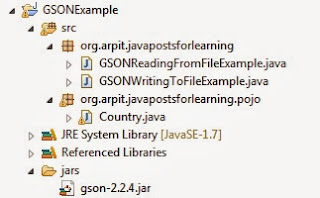
Project Structure:

Thanks a lot for this POST.
This was very informative and useful.
Thanks a lot.
nice article !!
Really Helpful
could you please help me that how could i ad contents to an existing json file using gson
fantastic thank u very much keep it up
really good one..
Really Nice Information,Thank You Very Much For Sharing.
Web Designing Company
Is there an example w/simple json where you update records within a json object.
For example w/structure below how to add a key/value pair to each element?
{
“data”: [
{
“Atomic Symbol”: “H”,
“Atomic Number”: “1”,
},
{
“Atomic Symbol”: “He”,
“Atomic Number”: “2”,
}
One of the simplest and best examples I have come across on the internet for GSON.. Great job!!