In this post,we will see how can we read and write JSON using Jackson.
Java JSON Tutorial Content:
- JSON Introduction
- JSON.simple example-read and write
- JSONGSON example-read and write
- JSONJackson example – read and write
- JSONJackson Streaming API – read and write JSON
After reading and writing JSON using GSON,we will use another way(i.e. Jackson) of reading JSON.
Jackson is a high performance Java library that can be used to convert Java Objects into their JSON representation. It can also be used to convert a JSON string to an equivalent Java object.
writeValue : It will convert simple pojo object to JSON.
         ObjectMapper mapper=new ObjectMapper();
         mapper.writeValue(new File("//Users//Arpit//country.json"), countryObj);
readValue : It will convert JSON to pojo object.
         ObjectMapper mapper=new ObjectMapper();
         BufferedReader br = new BufferedReader(
     new FileReader("//Users//Arpit//country.json"));

  //convert the json string back to object
  Country countryObj = mapper.readValue(br, Country.class);
Please note that there are many overloaded version of read and write value to support different parameters such as File,URL
In this post,we will read and write JSON using Jackson.
1). Create a java project named “jacksonJsonExample”
2) Add following maven dependency for jackson.
Pom.xml :
 4.0.0

 com.arpit.java2blog
 jacksonJsonExample
 0.0.1-SNAPSHOT
 jar

 jacksonJsonExample
 http://maven.apache.org


 UTF-8


 codehaus
 http://repository.codehaus.org/org/codehaus


 junit
 junit
 3.8.1
 test


 org.codehaus.jackson
 jackson-mapper-asl
 1.9.13
3) create a pojo named “Country.java”
package org.arpit.java2blog.pojo;

import java.util.ArrayList;
import java.util.List;

public class Country {

 String name;
 int population;
 private List listOfStates;

 //getter and setter methods

 public String getName() {
      return name;

 public void setName(String name) {
  this.name = name;
 }

 public int getPopulation() {
  return population;
 }

 public void setPopulation(int population) {
  this.population = population;
 }

 public List getListOfStates() {
  return listOfStates;
 }

 public void setListOfStates(List listOfStates) {
 this.listOfStates = listOfStates;
 }

}
Write JSON to file:
4) Create a new class named “JacksonJsonWriteToFileExample.java” in src->org.arpit.java2blog.jacksonJsonExample
package com.arpit.java2blog.jacksonJsonExample;

import java.io.File;
import java.io.IOException;
import java.util.ArrayList;
import java.util.List;

import org.codehaus.jackson.JsonGenerationException;
import org.codehaus.jackson.map.JsonMappingException;
import org.codehaus.jackson.map.ObjectMapper;

/**
 *
 * @author Arpit Mandliya
 *
 */
public class JacksonJsonWriteToFileExample
{
    public static void main( String[] args )
    {
      Country countryObj=new Country();
       countryObj.setName("India");
       countryObj.setPopulation(1000000);
       List listOfStates=new ArrayList();
       listOfStates.add("Madhya Pradesh");
       listOfStates.add("Maharashtra");
       listOfStates.add("Rajasthan");

       countryObj.setListOfStates(listOfStates);
       ObjectMapper mapper=new ObjectMapper();
       try {
   mapper.writeValue(new File("//Users//Arpit//country.json"), countryObj);

  } catch (JsonGenerationException e) {
   // TODO Auto-generated catch block
   e.printStackTrace();
  } catch (JsonMappingException e) {
   // TODO Auto-generated catch block
   e.printStackTrace();
  } catch (IOException e) {
   // TODO Auto-generated catch block
   e.printStackTrace();
  }
    }
}
Run above program and content of file country.json will be as below :
{"name":"India","population":1000000,"listOfStates":["Madhya Pradesh","Maharashtra","Rajasthan"]}
Write formatted JSON to file:
5) If you want to prettify json, you an use mapper.writerWithDefaultPrettyPrinter() to do it. Create a new class named “JacksonJsonWriteToFileFormattedExample.java” in src->org.arpit.java2blog.jacksonJsonExample
package com.arpit.java2blog.jacksonJsonExample;

import java.io.File;
import java.io.IOException;
import java.util.ArrayList;
import java.util.List;

import org.codehaus.jackson.JsonGenerationException;
import org.codehaus.jackson.map.JsonMappingException;
import org.codehaus.jackson.map.ObjectMapper;

/**
 *
 * @author Arpit Mandliya
 *
 */
public class JacksonJsonWriteToFileFormattedExample
{
    public static void main( String[] args )
    {
      Country countryObj=new Country();
       countryObj.setName("India");
       countryObj.setPopulation(1000000);
       List listOfStates=new ArrayList();
       listOfStates.add("Madhya Pradesh");
       listOfStates.add("Maharashtra");
       listOfStates.add("Rajasthan");

       countryObj.setListOfStates(listOfStates);
       ObjectMapper mapper=new ObjectMapper();
       try {
   mapper.writerWithDefaultPrettyPrinter().writeValue(new File("//Users//Arpit//country.json"), countryObj);
   System.out.println("Json written to the file");
  } catch (JsonGenerationException e) {
   // TODO Auto-generated catch block
   e.printStackTrace();
  } catch (JsonMappingException e) {
   // TODO Auto-generated catch block
   e.printStackTrace();
  } catch (IOException e) {
   // TODO Auto-generated catch block
   e.printStackTrace();
  }
    }
}
Run above program and content of file country.json will be as below :
{
  "name" : "India",
  "population" : 1000000,
  "listOfStates" : [ "Madhya Pradesh", "Maharastra", "Rajasthan" ]
}
Read JSON to file:
Here we will read above created JSON file.
6) Create a new class named “JacksonJsonReadFromFileExample.java” in src->org.arpit.java2blog.jacksonJsonExample
package com.arpit.java2blog.jacksonJsonExample;

import java.io.BufferedReader;
import java.io.FileReader;
import java.io.IOException;
import java.util.List;

import org.codehaus.jackson.map.ObjectMapper;

public class JacksonJsonReadFromFileExample {

 public static void main(String[] args)
 {
  ObjectMapper mapper =new ObjectMapper();
  try{
   System.out.println("Reading JSON from a file");
   System.out.println("----------------------------");

   BufferedReader br = new BufferedReader(
     new FileReader("//Users//Arpit//country.json"));

   //convert the json string back to object
   Country countryObj = mapper.readValue(br, Country.class);

   System.out.println("Name Of Country: "+countryObj.getName());

   System.out.println("Population: "+countryObj.getPopulation());

   System.out.println("States are :");

   List listOfStates = countryObj.getListOfStates();
   for (int i = 0; i < listOfStates.size(); i++) {
    System.out.println(listOfStates.get(i));
   }

  } catch (IOException e) {
   e.printStackTrace();
  }

 }
}
Run above program and you will get following output:
Reading JSON from a file
----------------------------
Name Of Country: India
Population: 1000000
States are :
Madhya Pradesh
Maharashtra
Rajasthan
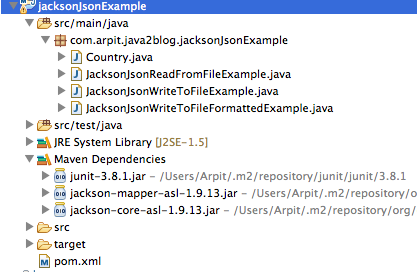
Project Structure: