
In this tutorial, we will see how to detect edges in the image using python open-cv, which exists as cv2 (computer vision) library.
You can use Canny() method of cv2 library to detect edges in an image. To use cv2 library, you need to import cv2 library using import statement.
Canny() method uses canny edge detection algorithm for finding the edges in the image.
Now let’s see the syntax and return value of cv2 canny() method first, then we will move on the examples.
Syntax
cv2.Canny(image, threshold1, threshold2, apertureSize, L2gradient)
Parameters
You can pass five parameters to resize() method. Among the five parameters, the first three(image,threshold ,and threshold2) are mandatory; rest(apertureSize and L2gradient) are optional.
-
Necessary parameters are:
image:Source/Input image of n-dimensional array.threshold1:It is the High threshold value of intensity gradient.threshold2:It is the Low threshold value of intensity gradient.apertureSize:Order of Kernel(matrix) for the Sobel filter. Its default value is (3 x 3), and its value should be odd between 3 and 7. It is used for finding image gradients. Filter is used for smoothening and sharpening of an image.L2gradient:This specifies the equation for finding gradient magnitude. L2gradient is of boolean type, and its default value isFalse.
Optional parameters are:
Return Value
It returns Grayscale edge detected image.
cv2 Canny() Method example
Now Let’s see the Python code :
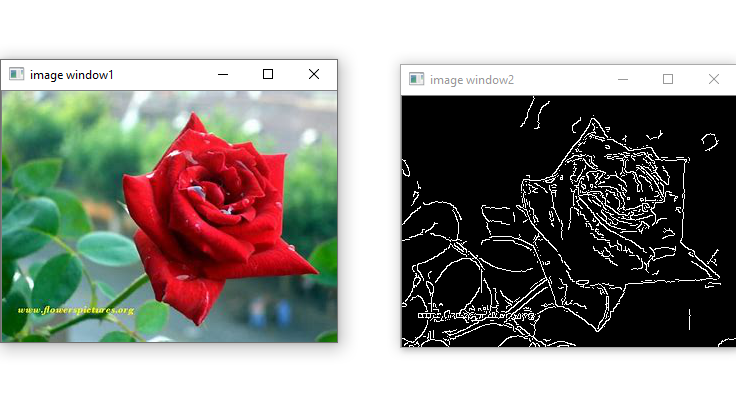
Example 1: Using Canny() method with necessary parameters only.
# import computer vision library(cv2) in this code
import cv2

# main code
if __name__ == "__main__" :

    # mentioning absolute path of the image
    img_path = "C:\\Users\\user\\Desktop\\flower.jpg"

    # read/load an image
    image = cv2.imread(img_path)

    # show the input image on the newly created image window
    cv2.imshow('image window1',image)

    # detection of the edges
    img_edge = cv2.Canny(image,100,200)

    # show the image edges on the newly created image window
    cv2.imshow('image window2',img_edge)
Output:
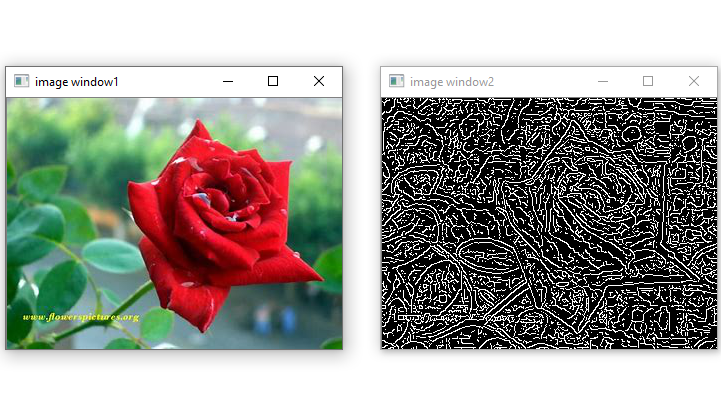
Example 2: Using Canny() method with apertureSize parameter value along with necessary parameters.
# import computer vision library(cv2) in this code
import cv2

# main code
if __name__ == "__main__" :

    # mentioning absolute path of the image
    img_path = "C:\\Users\\user\\Desktop\\flower.jpg"

    # read/load an image
    image = cv2.imread(img_path)

    # show the input image on the newly created image window
    cv2.imshow('image window1',image)

    # detection of the edges
    img_edge = cv2.Canny(image,100,200,apertureSize = 5)

    # show the image edges on the newly created image window
    cv2.imshow('image window2',img_edge)
Output :
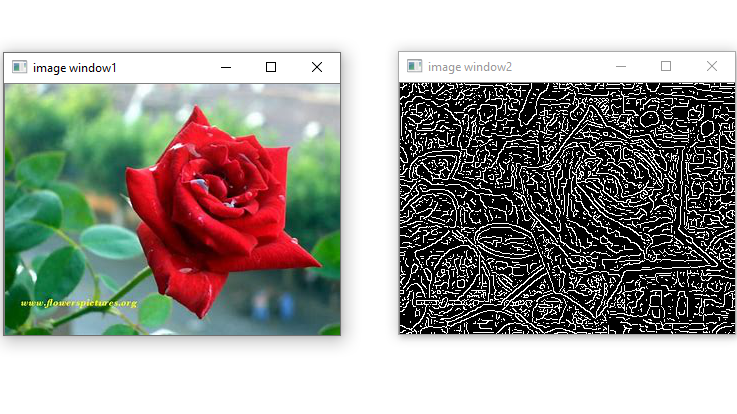
Example 3: Using Canny() method with L2gradient and apertureSize parameter values along with necessary parameters.
# import computer vision library(cv2) in this code
import cv2

# main code
if __name__ == "__main__" :

    # mentioning absolute path of the image
    img_path = "C:\\Users\\user\\Desktop\\flower.jpg"

    # read/load an image
    image = cv2.imread(img_path)

    # show the input image on the newly created image window
    cv2.imshow('image window1',image)

    # detection of the edges
    img_edge = cv2.Canny(image,100,200,apertureSize = 5, L2gradient = True)

    # show the image edges on the newly created image window
    cv2.imshow('image window2',img_edge)
Output:
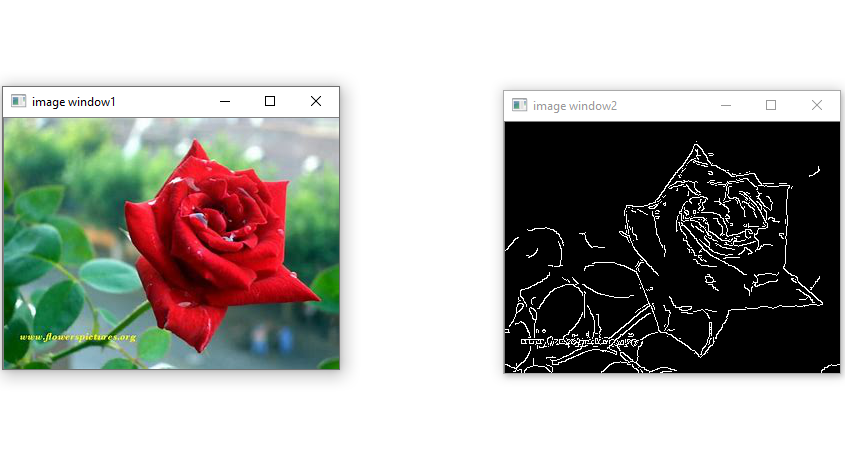
Example 4: Using Canny() method with L2gradient parameter value along with necessary parameters.
# import computer vision library(cv2) in this code
import cv2

# main code
if __name__ == "__main__" :

    # mentioning absolute path of the image
    img_path = "C:\\Users\\user\\Desktop\\flower.jpg"

    # read/load an image
    image = cv2.imread(img_path)

    # show the input image on the newly created image window
    cv2.imshow('image window1',image)

    # detection of the edges
    img_edge = cv2.Canny(image,100,200, L2gradient = True)

    # show the image edges on the newly created image window
    cv2.imshow('image window2',img_edge)
Output:
That’s all about cv2 Canny() Method in Python.
