
1. Introduction
In Python programming, a common task is to print matrices (two-dimensional arrays) in a readable format. This task is especially relevant in fields like data science and programming, where matrices are a fundamental data structure. Let’s explore different methods to print a matrix in Python, focusing on making the output understandable and neatly formatted.
A matrix is a two-dimensional data structure consisting of elements arranged in rows and columns. For example:
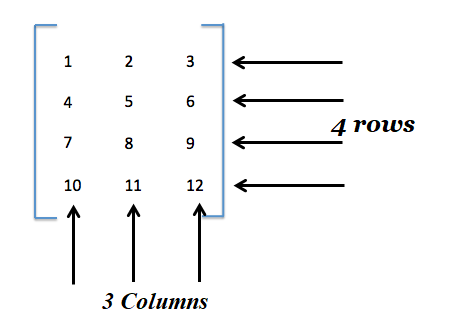
The above figure represents a 4×3 matrix since it has four rows and three columns.
Example Scenario: Imagine we have a simple 3×3 matrix:
matrix = [
    [1, 2, 3],
    [4, 5, 6],
    [7, 8, 9]
]
Our goal is to print this matrix in a format that looks like:
1 2 3
4 5 6
7 8 9
We will examine various methods to achieve this, ensuring that each method is explained in detail so that even beginners can understand.
2. Basic Looping with Indices
Using basic loops with row (i) and column (j) indices is a straightforward way to access and print each element of the matrix.
Code Explanation and Example:
def print_matrix_with_indices(matrix):
    # Loop over each row
    for i in range(len(matrix)):
        # Loop over each column in the current row
        for j in range(len(matrix[i])):
            # Print element at row i, column j
            print(matrix[i][j], end=' ')
        # Print a new line after each row
        print()


matrix = [
    [1, 2, 3],
    [4, 5, 6],
    [7, 8, 9]
]
# Test the function with our matrix
print_matrix_with_indices(matrix)
for i in range(len(matrix)): This loop iterates over each row in the matrix.len(matrix)gives the number of rows.- Inside the first loop,
for j in range(len(matrix[i]))iterates over each column in the current row.len(matrix[i])gives the number of columns in rowi. print(matrix[i][j], end=' '): This prints the element at the ith row and jth column.end=' 'ensures that elements are printed on the same line with a space in between.print(): This is used to move to the next line after each row is printed.
Output:
1 2 3
4 5 6
7 8 9
3. Using Join Method
The join() method in Python is a concise way to concatenate strings. It can be used to join elements of a row into a single string with spaces.
Code Explanation and Example:
def print_matrix_join(matrix):
    # Loop over each row
    for row in matrix:
        # Convert each element to a string and join with spaces
        print(' '.join(map(str, row)))


matrix = [
    [1, 2, 3],
    [4, 5, 6],
    [7, 8, 9]
]
# Test the function with our matrix
print_matrix_join(matrix)
for row in matrix: This loop goes through each row in the matrix.' '.join(map(str, row)):map(str, row)converts each element in the row to a string.' '.join(...)then joins these string elements with a space.
Output:
1 2 3
4 5 6
7 8 9
4. Pretty Printing with pprint
For more complex matrices, the pprint module from Python’s standard library can provide better formatting.
Code Explanation and Example:
import pprint

def print_matrix_pretty(matrix):
    # Use pprint to print the matrix
    pprint.pprint(matrix)

matrix = [
    [1, 2, 3],
    [4, 5, 6],
    [7, 8, 9]
]

# Test the function with our matrix
print_matrix_pretty(matrix)
pprint.pprint(matrix): This function from thepprintmodule prints the matrix in a more formatted way, which is especially useful for nested or irregular matrices.
Output:
[[1, 2, 3],
 [4, 5, 6],
 [7, 8, 9]]
5. Using NumPy Library
NumPy is a popular library for numerical computations in Python. It provides a straightforward way to create and print matrices.
Code Explanation and Example:
import numpy as np

def print_matrix_numpy(matrix):
    # Convert the list to a NumPy array
    np_matrix = np.array(matrix)
    # Print the NumPy array
    print(np_matrix)

matrix = [
    [1, 2, 3],
    [4, 5, 6],
    [7, 8, 9]
]

# Test the function with our matrix
print_matrix_numpy(matrix)
np.array(matrix): This converts the listmatrixinto a NumPy array, which has its own print functionality that formats matrices neatly.print(np_matrix): NumPy arrays are printed in a clean and readable format by default.
Output:
[[1 2 3]
 [4 5 6]
 [7 8 9]]
6. Performance Comparison
To compare the performance of the different matrix printing methods, we can use Python’s timeit module. This module allows us to measure the execution time of small code snippets. For our comparison, we’ll focus on the four methods discussed: basic looping with indices, using join(), pretty printing with pprint, and using NumPy.
Here’s a complete script for the performance comparison:
import timeit
import numpy as np
import pprint

# Define the matrix printing functions

def print_matrix_with_indices(matrix):
    for i in range(len(matrix)):
        for j in range(len(matrix[i])):
            print(matrix[i][j], end=' ')
        print()

def print_matrix_join(matrix):
    for row in matrix:
        print(' '.join(map(str, row)))

def print_matrix_pretty(matrix):
    pprint.pprint(matrix)

def print_matrix_numpy(matrix):
    np_matrix = np.array(matrix)
    print(np_matrix)

# Generate a large matrix for testing
large_matrix = [[i for i in range(100)] for _ in range(100)]

# Define a wrapper function for each method to suppress output during timing
def wrapper(func, *args, **kwargs):
    def wrapped():
        return func(*args, **kwargs)
    return wrapped

# Wrapped functions
wrapped_basic = wrapper(print_matrix_with_indices, large_matrix)
wrapped_join = wrapper(print_matrix_join, large_matrix)
wrapped_pretty = wrapper(print_matrix_pretty, large_matrix)
wrapped_numpy = wrapper(print_matrix_numpy, large_matrix)

# Measure execution time
time_basic = timeit.timeit(wrapped_basic, number=10)
time_join = timeit.timeit(wrapped_join, number=10)
time_pretty = timeit.timeit(wrapped_pretty, number=10)
time_numpy = timeit.timeit(wrapped_numpy, number=10)

# Print the results
print(f"Basic Looping with Indices Time: {time_basic:.5f} seconds")
print(f"Join Method Time: {time_join:.5f} seconds")
print(f"Pretty Print Time: {time_pretty:.5f} seconds")
print(f"NumPy Method Time: {time_numpy:.5f} seconds")
Explanation:
- We define the four matrix printing functions (
print_matrix_with_indices,print_matrix_join,print_matrix_pretty,print_matrix_numpy) as discussed earlier. - A large matrix (
large_matrix) is created for performance testing. This script uses a 100×100 matrix, but you can adjust the size as needed. wrapperfunction: This is used to create a wrapped version of each matrix printing function. The purpose is to suppress the output during the performance measurement.timeit.timeit: This function measures the execution time of each wrapped function.number=10means each function is executed 10 times, and the total time taken is measured.- Finally, we print the execution times for each method. The
:.5fin theprintstatements formats the time to five decimal places for precision.
Output:
Basic Looping with Indices Time: 8.12836 seconds
Join Method Time: 0.08645 seconds
Pretty Print Time: 8.09029 seconds
NumPy Method Time: 0.03813 seconds
Here are some points based on the output:
- For small to medium-sized matrices where readability is key, and performance is not a critical concern, pretty printing or basic looping could be used.
- For large matrices or when performance is a priority, the
joinmethod and especially NumPy are the recommended approaches. - NumPy’s Superior Performance: The NumPy method shows the best performance with an execution time of about 0.03813 seconds. This is over two times faster than the
joinmethod and significantly faster than the other methods. This superior performance is due to NumPy’s underlying implementation in C, which allows for highly optimized array operations. NumPy is specifically designed for high-performance matrix and array operations, making it the best choice in terms of speed for large-scale data.
7. Conclusion
We have explored various methods to print matrices in Python, suitable for different scenarios and levels of complexity. For beginners, methods like basic looping and using join are straightforward and easy to understand. As one progresses, methods utilizing NumPy or pprint offer more advanced options, especially for handling large or complex matrices. Understanding these methods provides a solid foundation for working with matrices in Python, an essential skill in many programming and data-related tasks.
