Using filter_var() method
We can use the filter_var() method which filters a variable based on supplied filter flag or ID. To extract numbers from the string variable, we can pass the FILTER_SANITIZE_NUMBER_INT id.
Let’s see an example using this method.
0045456This approach isn’t efficient for certain use case, and simply returns the numbers present within the string together. For a more efficient, we can rely on regular expression.
Use preg_match_all() method
Use
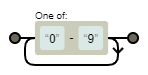
preg_match_all()method with/[0-9]+/to extract numbers from String in PHP.$string = "Welcome to the 0045 and the 456 arena"; preg_match_all('/[0-9]+/', $string, $matches); print_r($matches);Array ( [0] => Array ( [0] => 0045 [1] => 456 ) )Here, output is array of matches, which can then be used to extract the numbers from the string.
We used the
preg_match_all()function to search for the regular expression and extracted the numbers from the string.We used regular expression in the form of a pattern
/[0-9]+/that matched the numbers in the string.
preg_match_all performs global regular expression match. It takes three arguments:
$pattern: The pattern to be searched
$subject: Input String
$matches:Array of all matches in the String.Use
preg_replace()methodWe can achieve the same output as the
filter_varmethod using regular expression where we replace all the characters that are not numbers with empty whitespace. The regular expression match value would be/[^0-9]/.Let’s illustrate this approach on the same string as in the previous section.
$string = 'Welcome to the 0045 and the 456 arena'; $int = preg_replace('/[^0-9]/', '', $string); echo $int;0045456preg_replace() performs global regular expression match. It takes three arguments:
$pattern: The pattern to be searched
$replacement: the string to replace with searched string
$subject: Input String