
If you are getting below error while running the Maven build.
No compiler is provided in this environment. Perhaps you are running on a JRE rather than a JDK?
There are 3 ways to solve No compiler is provided in this environment. Perhaps you are running on a JRE rather than a JDK?.
[toc]
Eclipse maven error
If you are getting this error, while doing maven build on eclipse then you must check if you are using JDK rather JRE in eclipse.
-
- In eclipse, click on
Window -> Preferences -> Java -> Installed JREs - Verify that
JDKis checked rather thanJRE.
- In eclipse, click on
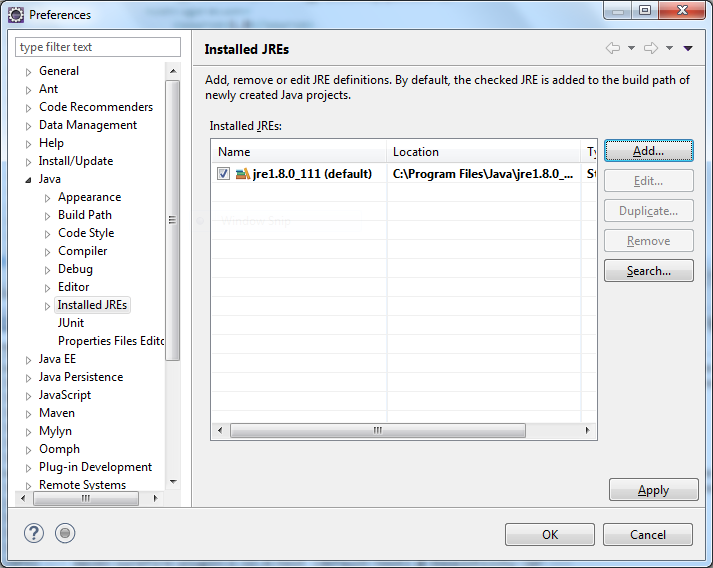
-
- If
JREis checked, then you need to add JDK by clicking on Add -> Standard VM -> Next -> Directory and browse the JDK path
- If
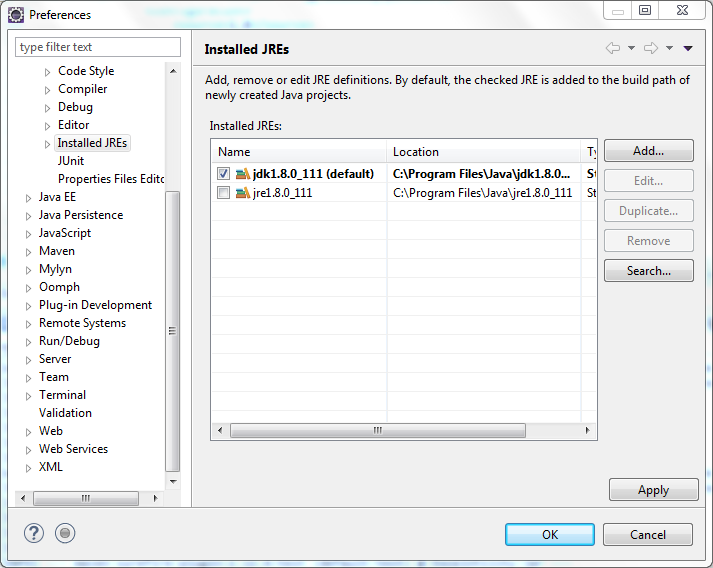
This will resolve the error in eclipse.
Add executable in pom.xml
You can set fork to true and executable to fully qualified JDK path in maven-compiler-plugin.
<build>
...
    <plugins>
    ...
        <plugin>
            <artifactId>maven-compiler-plugin</artifactId>
            <version>3.1</version>
            <configuration>
                <fork>true</fork>
                <executable>C:\Program Files\Java\jdk1.8.0_45\bin\javac.exe</executable>
            </configuration>
        </plugin>
    </plugins>
</build>
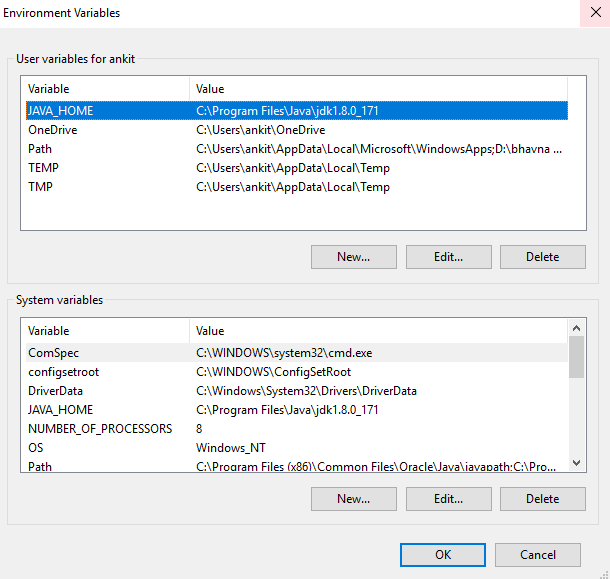
Set JAVA_HOME to JDK
Go to System properties -> Advanced system settings -> Advanced -> environment variable and add JAVA_HOME to environment variable.
Reference: https://stackoverflow.com/questions/19655184/no-compiler-is-provided-in-this-environment-perhaps-you-are-running-on-a-jre-ra
I hope this will resolve the error.That’s all about No compiler is provided in this environment. Perhaps you are running on a JRE rather than a JDK?

thank’s Man, everything started to work
Good. It work fine for me